
If you are searching for a high-agency SwiftKey Copilot alternative on Android, you have likely hit a wall with Microsoft's rigid, pre-baked rewrite modes, invasive account requirements, and clunky floating web panels.
Quick Verdict: The best SwiftKey Copilot alternative on Android is Synapse AI Keyboard. While Microsoft SwiftKey restricts your writing to four generic, hardcoded tones (Professional, Casual, Polite, Social Post) and requires continuous Microsoft telemetry, Synapse gives you an open prompt engine to execute custom AI instructions directly at your cursor with 100% offline keystroke privacy and non-expiring pay-as-you-go credits from $5.
┌──────────────────────────────────────────────────────────────────────────┐
│              THE RIGID AI BUTTON VS. CUSTOM PROMPT AGENT GAP             │
├────────────────────────────┬─────────────────────────────────────────────┤
│ Microsoft SwiftKey Copilot │ 4 fixed rewrite modes · Bing login required │
│                            │ Cloud telemetry · No custom prompt engine   │
├────────────────────────────┼─────────────────────────────────────────────┤
│ Synapse AI Keyboard        │ Unlimited custom prompts · In-place atomic  │
│                            │ 100% offline keystrokes · $5 non-expiring   │
└────────────────────────────┴─────────────────────────────────────────────┘
Mobile communication is not one-size-fits-all. A freelance developer pitching a $5,000 React Native contract on Upwork requires a completely different instruction set than an executive defending scope creep on Slack or a crypto trader expanding a 42-character wallet address.
In this deep comparative analysis, we explore why an Android keyboard with custom AI prompts outperforms fixed AI buttons, break down the architectural differences between Microsoft SwiftKey Copilot and Synapse AI Keyboard, and demonstrate how you can deploy custom, cursor-level AI agents starting with 20,000 free starter credits.
1. The 4 Fatal Flaws of Microsoft SwiftKey Copilot for Mobile Power Users
Microsoft SwiftKey is one of the most widely installed keyboards in the Android ecosystem. However, its implementation of generative AI prioritizes Microsoft ecosystem expansion and Bing search funneling rather than deep user agency.
┌──────────────────────────────────────────────────────────────────────────┐
│                   SWIFTKEY COPILOT VS. POWER USER NEEDS                  │
├───────────────────────────────────┬──────────────────────────────────────┤
│ SwiftKey Copilot Limitation       │ Power User Real-World Requirement   │
├───────────────────────────────────┼──────────────────────────────────────┤
│ 1. 4 Generic Rewrite Presets      │ Custom prompts with dynamic context  │
│ 2. Invasive Microsoft Telemetry   │ 100% offline typing & zero keylogger │
│ 3. Disruptive Floating Sheets     │ Atomic in-place cursor replacement   │
│ 4. Zero Offline Power Utilities   │ Room DB shortcuts & Precision D-Pad  │
└───────────────────────────────────┴──────────────────────────────────────┘
1.1 The "4 Generic Modes" Problem (Zero Custom Prompt Flexibility)
SwiftKey Copilot gives you four predefined rewrite styles: Professional, Casual, Polite, and Social Post.
While changing a hasty sentence to "Polite" works for casual emails, it fails completely for specialized professional workflows:
- The Freelance Pitch: It cannot analyze a client's project brief on Upwork and write a tailored 3-bullet proposal addressing tech stack and delivery timelines. Check our freelancer AI prompts guide for high-converting templates.
- The Scope Defense: It cannot take the phrase "we didn't agree to build a whole new auth system" and transform it into a diplomatic, contractual boundary statement that protects billable hours.
- The Technical Translation: It cannot translate conversational English into fluent, technical German or formal Urdu while maintaining domain-specific vocabulary.
Because SwiftKey offers no custom prompt builder, you are forever trapped within Microsoft's generic tone definitions.
1.2 Telemetry, Account Lock-In, and Keystroke Concerns
To unlock Copilot features in SwiftKey, users must sign in with a Microsoft account. SwiftKey routes user prompts and text snippets through Microsoft's cloud infrastructure and Bing search endpoints.
For developers working with proprietary APIs, founders handling confidential investor terms, or privacy-conscious individuals, continuous background telemetry and cloud dependency present an unnecessary attack surface. Learn more in our Android keyboard privacy guide.
1.3 Disruptive Modals vs. Atomic Cursor Execution
When you invoke Copilot in SwiftKey, the interface often loads a separate bottom sheet or web-based query box. You must wait for the modal to render, read the response, copy it, dismiss the sheet, and paste it back into your chat.
This friction ruins the flow of mobile conversation. A true custom prompt keyboard Android tool must execute in-place at the cursor, replacing raw text atomically without ever leaving the conversation thread. See our breakdown on how to use an AI keyboard in WhatsApp.
1.4 Lack of Offline Shortcuts and Technical Editing Controls
SwiftKey lacks modern power-user tools like instant offline text expansion shortcuts (expanding ethaddr into a full crypto address in 0ms without cloud calls) and offers only rudimentary cursor control via spacebar swiping, which is imprecise when editing individual syntax characters or code snippets on glass.
2. Feature Matrix: Microsoft SwiftKey Copilot vs. Synapse AI Keyboard
Let's examine how Microsoft SwiftKey Copilot compares against Synapse across architecture, prompt customizability, privacy, and speed:
| Capability / Architecture | Microsoft SwiftKey Copilot | Synapse AI Keyboard (synapsetalk.com) |
|---|---|---|
| Custom AI Prompt Builder | ❌ None (Fixed 4 tone buttons) | ✅ Unlimited Custom Prompt Agents (CustomPromptEntity.kt) |
| In-Place Cursor Replacement | ⚠️ Floating sheet / multi-tap paste | ✅ Instant Atomic In-Place Engine (OnDemandAiExecutionEngine.kt) |
| Normal Keystroke Privacy | ⚠️ Microsoft diagnostic telemetry | 🔒 100% Offline Typing (Zero Cloud Keylogger) |
| Password & OTP Shield | ⚠️ Generic OS handling | 🛡️ Auto-Exclusion (TYPE_TEXT_VARIATION_PASSWORD) |
| Security Audit Verification | ⚠️ Closed-source ecosystem telemetry | 🛡️ Clean 0/60 VirusTotal Security Audit |
| Offline Text Expansion | ⚠️ Basic clipboard history | ✅ 0ms SQLite Room DB Expansion (ShortcutDao.kt) |
| Cursor Control & Navigation | ⚠️ Spacebar swipe only | ✅ 4-Way Precision D-Pad Console (TextEditorCore.kt) |
| Acoustic Feedback Profiles | ❌ Standard click only | ✅ 10 Synthesized Mechanical Audio Profiles (KeySoundEngine.kt) |
| Pricing & Monetization | ⚠️ "Free" via ad/telemetry lock-in | 💎 Non-Expiring Pay-As-You-Go ($5–$30) + 20k Free Starter |
| Crypto Payment Incentive | ❌ None | ✅ USDT (+30% Energy Bonus via Cryptomus) |
| Free Client-Side Web Tools | ❌ None (Requires Bing web app) | ✅ 20+ Zero-Telemetry Privacy Web Tools (/tools/*) |
3. Why Custom Prompts Beat Fixed AI Buttons Every Time
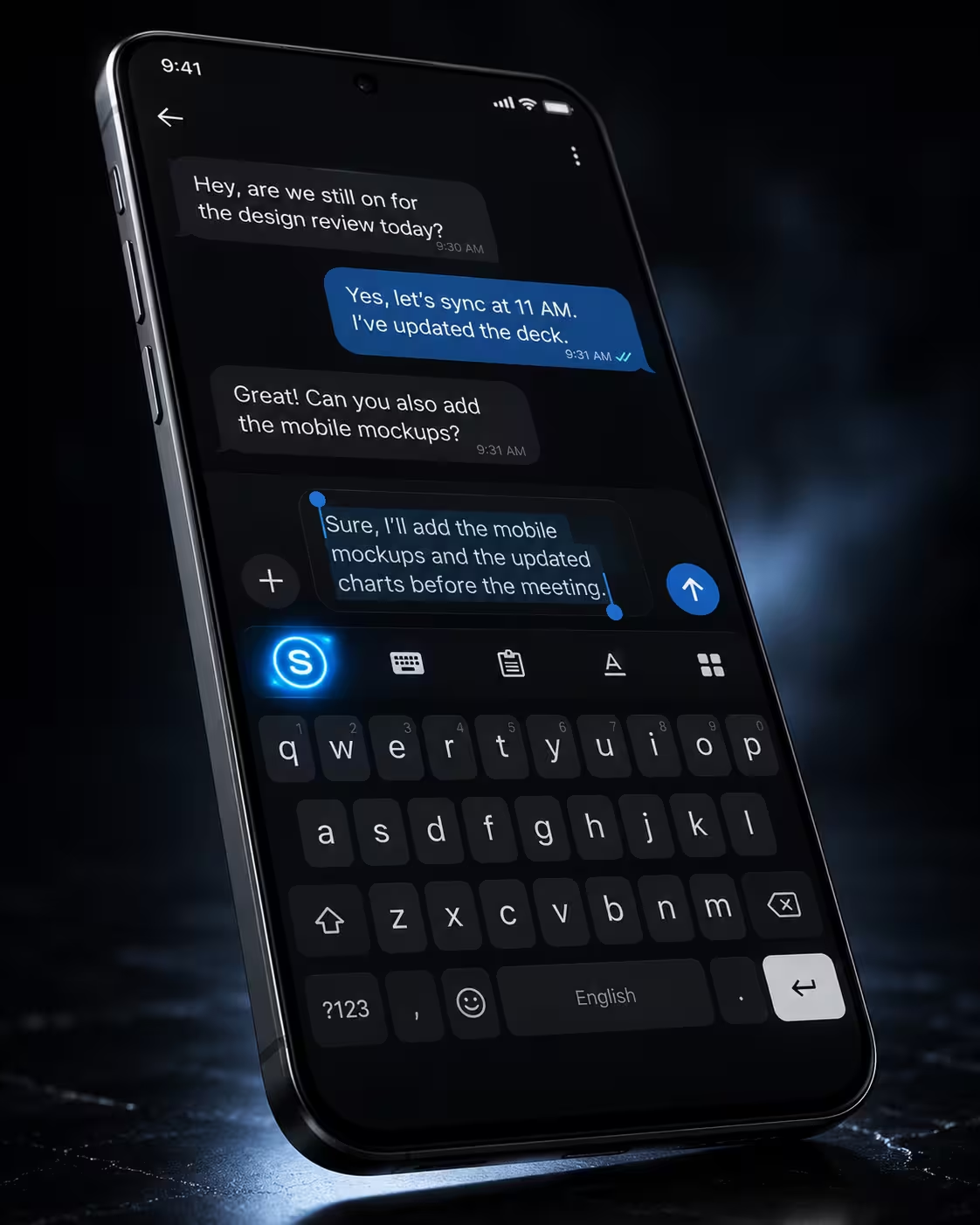
Synapse Keyboard UI: Custom Prompt Engine at Cursor
The fundamental breakthrough of Synapse AI Keyboard is treating the mobile keyboard not as a static input grid, but as an on-demand prompt execution runtime.
Instead of restricting you to four generic tones, Synapse allows you to create custom prompt agents tailored precisely to your specific career, business, or language needs.
┌──────────────────────────────────────────────────────────────────────────┐
│                   HOW SYNAPSE CUSTOM PROMPTS WORK                        │
├──────────────────────────────────────────────────────────────────────────┤
│ 1. Highlight raw thought in WhatsApp / Upwork / Gmail / Slack            │
│ 2. Tap the 'S' AI Toolbar Pill                                           │
│ 3. Select your custom prompt agent (e.g., "Upwork Pitch Pro")            │
│ 4. `OnDemandAiExecutionEngine.kt` intercepts & replaces text in 2.4s     │
└──────────────────────────────────────────────────────────────────────────┘
3.1 Scenario 1: The High-Ticket Upwork Proposal
- With SwiftKey Copilot: You type a draft on your phone, click Copilot, tap "Professional", and get a generic corporate rewrite that ignores the client's specific requirements, budget constraints, and technical stack.
- With Synapse: You highlight the client's job requirements, tap your saved custom prompt "Upwork React Native Pitch", and the engine produces a tailored 3-paragraph pitch detailing relevant project experience, architecture considerations, and a clear call to action in under 3 seconds.
3.2 Scenario 2: Executive Scope Creep & Boundary Defense
- With SwiftKey Copilot: You draft "I cannot do this extra backend work for free" and tap "Polite". Copilot turns it into a passive sentence that leaves room for client exploitation.
- With Synapse: You tap your custom preset "Scope Shield / Diplomatic Pushback". Synapse applies your pre-configured negotiation rules:
"I'd be glad to handle the additional database migrations! Because this falls outside our original sprint scope, I can prepare a separate estimate for 8 hours of development so we keep the current release on schedule."
3.3 Scenario 3: Real-Time Multilingual Technical Support
- With SwiftKey Copilot: Translating requires bouncing between translator tabs and losing context on technical acronyms.
- With Synapse: You configure a custom prompt "German Tech Support Formal" with system instructions: "Translate to formal German (Sie-form), maintain technical terminology in English (API, Webhook, Docker), and sound respectful yet authoritative." You execute it in WhatsApp with a single tap.
4. Architectural Deep Dive: How Synapse Executes In-Place Without Silos
Traditional AI assistants require an exhausting 8-step copy-paste routine:
┌──────────────────────────────────────────────────────────────────────────┐
│              THE TRADITIONAL 8-STEP AI COPY-PASTE CYCLE                  │
├──────────────────────────────────────────────────────────────────────────┤
│ [Type Draft] ➔ [Select All] ➔ [Copy] ➔ [Switch App to ChatGPT]           │
│ ➔ [Paste] ➔ [Submit Prompt] ➔ [Copy Response] ➔ [Switch Back & Replace]  │
└──────────────────────────────────────────────────────────────────────────┘
Synapse replaces this entire cycle with a native, atomic Input Method Service pipeline:
┌──────────────────────────────────────────────────────────────────────────┐
│                  SYNAPSE ZERO-SILO IN-PLACE PIPELINE                     │
├──────────────────────────────────────────────────────────────────────────┤
│ [Type Draft] ➔ [Tap Custom Prompt Pill] ➔ [Atomic In-Place Replacement]  │
│                     (Elapsed Time: 2.1 – 2.8 seconds)                    │
└──────────────────────────────────────────────────────────────────────────┘
4.1 The Native InputMethodService Architecture
Built with Kotlin for Android 8.0 through Android 15, Synapse operates directly inside the OS InputMethodService lifecycle:
- When you select text and trigger a prompt,
OnDemandAiExecutionEngine.ktcaptures the active text buffer throughInputConnection.getSelectedText(). - The payload is securely processed with your custom prompt instructions.
- Upon response return,
TextEditorCore.ktatomically commits the transformed text back into the target input field viaInputConnection.commitText(), seamlessly preserving undo/redo history.
4.2 100% Offline Keystrokes & Verified Privacy
Unlike cloud keyboards that continuously upload telemetry, Synapse isolates offline typing from AI execution:
- Zero Typing Cloud: Your everyday keystrokes, personal dictionary, and typing speed data never leave your local device.
- Password & OTP Shield: When entering password or two-factor authentication fields (
TYPE_TEXT_VARIATION_PASSWORD,TYPE_TEXT_VARIATION_VISIBLE_PASSWORD, numeric PINs), Synapse automatically disables AI interception and clipboard logging. - 0/60 VirusTotal Score: Synapse carries a clean 0/60 VirusTotal security audit report, verifying that the binary contains zero ad trackers, spyware, or malicious background services. Read our full Android keyboard privacy guide.
5. Beyond AI: Power Tools Built for High-Output Typing
While Microsoft SwiftKey focuses on predictive autocomplete, Synapse includes specialized hardware and software utilities engineered for programmers, writers, and technical communicators:
5.1 4-Way Precision D-Pad & Cursor Console
Editing tiny text strings, code variables, or markdown syntax on a smartphone touchscreen is notoriously inaccurate. Synapse integrates a dedicated 4-way D-Pad cursor navigation console with 1-tap utility buttons:
- Directional Precision: Move the cursor left, right, up, or down by single character increments.
- 1-Tap Action Bar: Execute Select All, Cut, Copy, Paste, Undo, and Redo with dedicated tactile buttons.
5.2 0ms Offline Text Expansion Shortcuts (ShortcutDao.kt)
Store frequently typed snippets locally on your device using SQLite Room Database:
- Type
addr+ space ➔ Expands instantly to your complete 42-character Web3 wallet address. - Type
meet+ space ➔ Expands to your personal Calendly or Google Meet link. - Type
iban+ space ➔ Expands to your international wire transfer credentials.
Because these shortcuts execute 100% locally on your device, they trigger in 0 milliseconds with zero AI energy credit cost and zero network requests.
5.3 10 Synthesized Mechanical Audio Profiles
Turn standard touchscreen typing into a tactile, acoustic experience. Powered by KeySoundEngine.kt, choose from 10 synthesized audio profiles:
- Mech Click (Blue Switch tactile snap)
- Typewriter (Vintage mechanical carriage clack)
- Crystal Ping (High-frequency modern acoustic)
- Retro Beep (8-bit nostalgic synthesizer)
- Soft Rubber (Damped membrane thump)
- Neon Zap (Futuristic synth pulse)
- Pop (Bubble acoustic feedback)
- Water Drop (Crisp hydro click)
- Wood Tap (Organic wooden thud)
- Silent / Off (Pure haptic vibration)
6. Transparent Economics: Non-Expiring Energy Credits vs. Ad Telemetry
Microsoft SwiftKey is bundled for "free" because it acts as an onboarding funnel for Microsoft accounts, Bing search, and diagnostic data collection. Other AI keyboards like TypeAI and Grammarly charge aggressive subscriptions of $15 to $30 every month that expire even if you don't use them.
Synapse adopts a transparent, developer-first pay-as-you-go energy credit model:
┌──────────────────────────────────────────────────────────────────────────┐
│                   SYNAPSE PAY-AS-YOU-GO TIERS                            │
├──────────────┬─────────────┬─────────────────┬───────────────────────────┤
│ Tier Name    │ Price (USD) │ Standard Credits│ Crypto Credits (+30% USDT)│
├──────────────┼─────────────┼─────────────────┼───────────────────────────┤
│ Free Starter │ $0.00       │ 20,000 cr       │ 20,000 cr (No Card Req.)  │
│ Mini         │ $5.00       │ 500,000 cr      │ 550,000 cr                │
│ Starter      │ $10.00      │ 1,000,000 cr    │ 1,150,000 cr              │
│ Growth       │ $15.00      │ 1,500,000 cr    │ 1,800,000 cr              │
│ Scale        │ $20.00      │ 2,000,000 cr    │ 2,500,000 cr              │
│ Max (Popular)│ $30.00      │ 3,000,000 cr    │ 3,900,000 cr              │
└──────────────┴─────────────┴─────────────────┴───────────────────────────┘
Why Non-Expiring Credits Save You Hundreds of Dollars:
- No Monthly Reset: Your energy credits never expire. If you purchase a $10 Starter Pack (1,000,000 credits) and go on vacation for a month, your full balance remains intact.
- Crypto Payment Bonus (+30%): Pay via USDT or supported cryptocurrencies via Cryptomus to receive an automatic +30% bonus credit allocation on every tier.
- Zero Credit Card Required: Create a free account using Google sign-in to receive 20,000 complimentary starter credits immediately.
For a detailed breakdown of subscription traps vs. energy credits, read our in-depth TypeAI alternative comparison, Grammarly alternative analysis, and AI keyboard without subscription guide.
7. How to Switch from SwiftKey to Synapse in 60 Seconds
Migrating to Synapse on Android is quick and requires zero technical configuration:
Step 1: Download & Verify the APK
- Head to synapsetalk.com and download the official Synapse APK.
- Verify the public SHA-256 checksum or view our clean 0/60 VirusTotal audit report.
- Tap the downloaded file to install (Google Play Protect will automatically verify the package signature).
Step 2: Enable Synapse in Android Settings
- Navigate to Android Settings ➔ System ➔ Languages & Input ➔ On-screen Keyboard. (Check our how to change keyboard on Android guide if you need OEM-specific steps).
- Toggle Synapse Keyboard to ON.
- Tap Manage Keyboards and set Synapse as your default input method.
Step 3: Claim 20,000 Free Credits & Build Your First Custom Prompt
- Open the Synapse app from your app drawer and sign in with Google (no credit card required).
- Claim your 20,000 free starter credits.
- Open the Custom Prompts tab and tap + Create Prompt.
- Give your prompt a title (e.g., "Upwork Bid Polisher"), add your system instructions, and save it.
- Open WhatsApp, Slack, or Gmail, highlight any drafted text, tap the 'S' toolbar button, and watch your custom prompt execute in place.
8. Frequently Asked Questions (FAQ)
What makes Synapse the best SwiftKey Copilot alternative on Android?
While SwiftKey Copilot restricts users to 4 fixed rewrite modes and requires Microsoft account telemetry, Synapse allows you to create unlimited custom AI prompts, execute them in-place directly at the cursor, and enjoy 100% offline normal keystroke privacy with non-expiring pay-as-you-go energy credits starting at $5.
Can you build custom AI prompts inside Microsoft SwiftKey Copilot?
No. Microsoft SwiftKey does not allow users to create or save custom prompts. You are restricted to four hardcoded presets (Professional, Casual, Polite, Social Post). With Synapse, you can define unlimited custom system prompts for client proposals, tone shifts, coding snippets, and multilingual translations.
Does SwiftKey Copilot require a Microsoft account and log keystrokes?
Yes, using Copilot features in SwiftKey requires signing in with a Microsoft account, and your prompt queries are routed through Microsoft Bing cloud infrastructure. In contrast, Synapse keeps all regular typing completely offline on your device, enforces zero cloud keylogging, and only processes text that you explicitly highlight and submit to an AI prompt.
Is Synapse free to use, and how do credits work?
Synapse provides 20,000 free starter energy credits upon sign-in with no credit card required. When you need more, you can purchase non-expiring credit packs starting from just $5 (500,000 credits), completely avoiding the $15–$30/month recurring subscription traps used by other AI keyboards.
How long does it take to switch from SwiftKey to Synapse?
Switching takes under 60 seconds. Download the verified APK from synapsetalk.com, enable Synapse in Android's Language & Input settings, and claim your 20,000 free credits upon launch.
Ready to Upgrade from Fixed AI Buttons to Custom Mobile Prompts?
Fixed AI buttons belong to the past generation of mobile typing tools. If you are ready for a keyboard that respects your workflow, protects your privacy, and gives you unlimited prompt-building power directly at the cursor, make the switch today.
Download Synapse AI Keyboard · Claim 20,000 Free Credits · Build your first custom keyboard prompt today.
Explore Related Guides & Tools
- Custom AI Prompts Android Guide — Master advanced prompt engineering on mobile.
- AI Prompts for Freelancers — Close more Upwork and Fiverr contracts directly from your phone.
- TypeAI Alternative for Android — Stop paying $15/month for basic keyboard AI features.
- Grammarly Keyboard Alternatives on Android — Compare top grammar-fixing keyboards without subscriptions.
- Android Keyboard Privacy Guide — Why offline keystroke isolation matters for mobile security.
- How to Use AI Keyboard in WhatsApp — Trigger AI prompts and translations inside WhatsApp chats.
- Free WhatsApp Text Formatter Tool — Format bold, italic, monospace, and strike-through text online.