
Using custom AI prompts on Android is the ultimate productivity hack for anyone tired of the endless copy-paste cycle between chat apps and standalone AI chatbots. Instead of copying a message from WhatsApp, opening ChatGPT, typing a prompt, copying the result, and switching back, you can execute custom prompt instructions directly from your keyboard toolbar in any Android application.
Whether you need to polish grammar while preserving your casual voice, draft instant professional client updates, de-escalate difficult conversations, or translate text with nuanced cultural context, custom prompts turn repetitive mobile typing into a 1-tap, 3-second workflow.
Quick Answer (The 3-Second In-Place Android AI Prompt Formula):
- Type your raw draft or bullet points directly inside any app (WhatsApp, Slack, Gmail, Telegram).
- Select the text and tap your saved Custom AI Prompt shortcut on the keyboard toolbar.
- Execute the prompt — the AI instantly transforms your draft in place at the cursor without switching apps, leaking clipboard data, or charging recurring monthly subscriptions.
┌──────────────────────────────────────────────────────────────────────────┐
│             MOBILE PROMPTING: STANDALONE AI VS. IN-PLACE KEYBOARD        │
├──────────────────────────────────┬───────────────────────────────────────┤
│ The 8-Step App-Switching Loop    │ Type draft ➔ Copy text ➔ Switch app   │
│ (ChatGPT / Claude / Web Portals) │ ➔ Open AI app ➔ Paste ➔ Type prompt   │
│                                  │ ➔ Copy output ➔ Switch back ➔ Paste   │
│                                  │ Result: 45–60 seconds of friction     │
├──────────────────────────────────┼───────────────────────────────────────┤
│ The 1-Tap Synapse Keyboard Flow  │ Type raw thoughts ➔ Highlight text ➔  │
│ (In-Place Android IME Execution) │ Tap Saved Prompt ➔ Polished in 3s     │
│                                  │ Result: Zero context switching        │
└──────────────────────────────────┴───────────────────────────────────────┘
Below is the definitive custom AI prompts Android guide, covering the 4-pillar prompt engineering framework for mobile keyboards, 10 ready-to-use prompt blueprints, anti-hallucination safety guardrails, and how to set up custom prompts on Android.
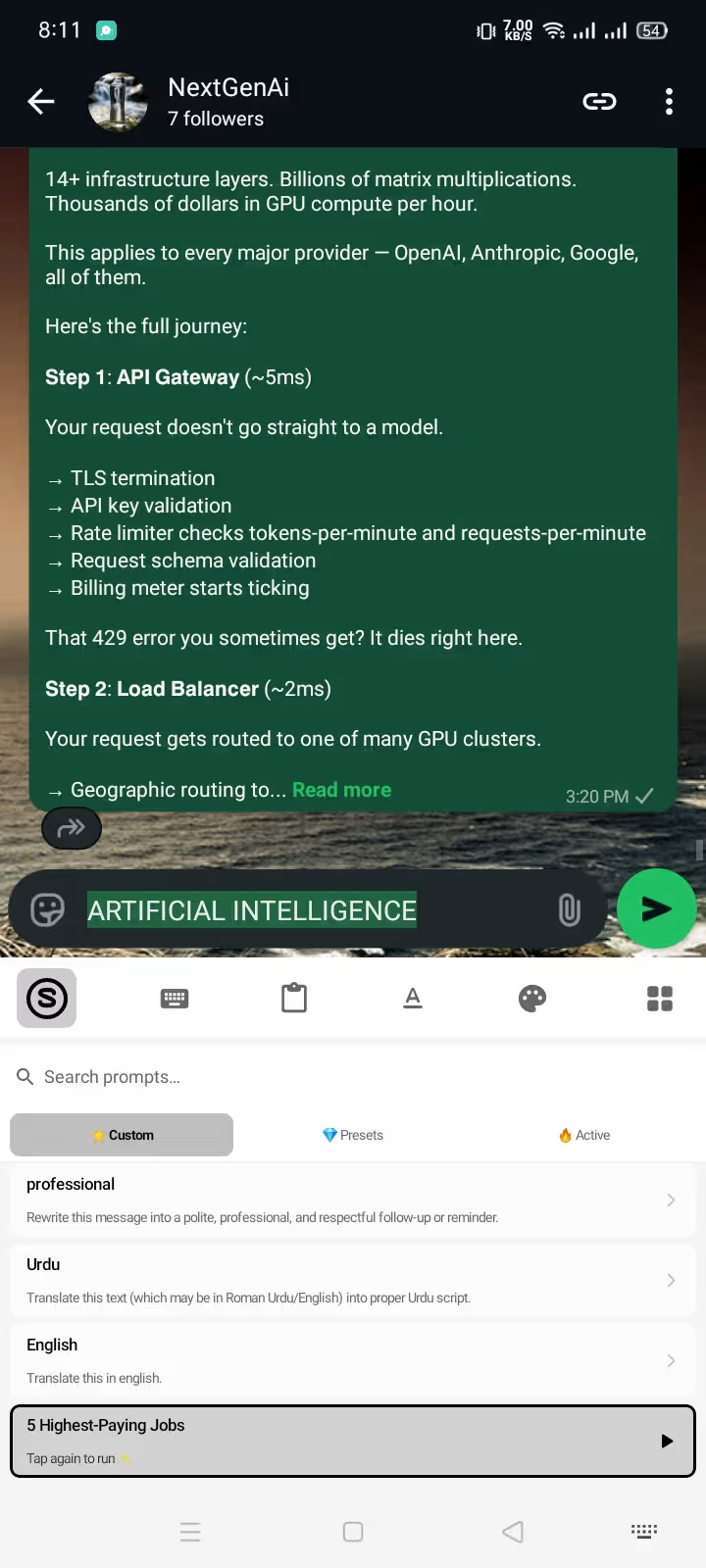
1. The Anatomy of a High-Performing Keyboard Prompt
Generic prompts like "Make this better" or "Fix this" consistently produce stiff, robotic text that sounds like a corporate legal disclaimer. On a mobile keyboard, great prompts are constraint-driven and designed to operate on selected text drafts rather than open-ended questions.
A high-performing custom AI keyboard prompt follows the 4-Pillar Mobile Prompt Architecture:
┌──────────────────────────────────────────────────────────────────────────┐
│                 THE 4-PILLAR MOBILE PROMPT ARCHITECTURE                  │
├───────────────────┬──────────────────────────────────────────────────────┤
│ 1. The Core Job   │ Exact action: Rewrite, condense, soften, translate.  │
├───────────────────┼──────────────────────────────────────────────────────┤
│ 2. The Persona    │ Voice context: Friendly peer, firm vendor, client.   │
├───────────────────┼──────────────────────────────────────────────────────┤
│ 3. The Guardrails │ Negative constraints: "Never alter dates/prices",    │
│                   │ "No exclamation marks", "Under 30 words".            │
├───────────────────┼──────────────────────────────────────────────────────┤
│ 4. The Source     │ The raw selected draft provided by your keyboard.    │
└───────────────────┴──────────────────────────────────────────────────────┘
Why "Draft-First" Prompting Beats Blank Generation
When you ask an AI to write a message from scratch without a draft, it hallucinates details, guesses your tone, and uses cliché filler words ("I hope this message finds you well").
When you provide a rough draft first (even messy bullet points with typos) and apply a custom prompt, the AI preserves your core facts, intent, and authentic voice while fixing syntax, formatting, and tone.
2. Top 10 Ready-to-Use Custom AI Prompt Blueprints for Android
Here are 10 battle-tested custom prompt templates you can copy directly into your AI keyboard on Android:
Category A: Tone Adjustment & Professional Communication
Blueprint 1: The Invisible Grammar Polish (Keep My Voice)
- Best for: Everyday texts, casual chats, Slack messages where you want correct grammar without sounding stiff.
- Prompt Template:
Fix grammar, spelling, and punctuation in the provided text. Maintain the original tone, level of formality, and slang exactly as written. Do not add corporate jargon or make the text sound formal.
- Raw Draft:
hey man r u free tmrw around 3 to check the design drafts? - AI Output:
Hey man, are you free tomorrow around 3 to check the design drafts?
Blueprint 2: The Professional Client Reply (Firm & Scope-Safe)
- Best for: WhatsApp client communications, scope management, status updates.
- Prompt Template:
Transform this draft into a professional, concise client message. Keep all factual details, pricing, and deadlines unchanged. Confirm deliverables clearly, state any missing requirements, and close with one specific next-step question. Under 60 words.
- Raw Draft:
cant do the extra logo changes today without extra budget, finish homepage first - AI Output:
Hi [Client], I can certainly handle the additional logo revisions once the homepage is finalized. We can add those revisions as a separate milestone. Does that work for your timeline?
For more client-specific patterns, see our dedicated guide on AI prompts for freelancer client messages and our tutorial on professional WhatsApp client replies on Android.
Blueprint 3: The Calm Boundary (De-escalation & No Blame)
- Best for: Resolving tense disputes, declining weekend work, setting firm personal boundaries.
- Prompt Template:
Rewrite this draft to be calm, polite, and completely non-defensive. Remove all blame, passive-aggressive remarks, and sarcasm. State the boundary clearly without apologizing or making promises not in the draft.
- Raw Draft:
Stop messaging me on Sunday night for non-emergencies I am not your 24/7 worker - AI Output:
Hi [Name], I am offline for the weekend and will review this first thing Monday morning during work hours.
Category B: Conciseness & Executive Summaries
Blueprint 4: The 1-Line Executive Summary (TL;DR)
- Best for: Turning rambling thoughts into tight Slack updates or executive emails.
- Prompt Template:
Condense the selected text into a single crisp sentence. Lead with the key decision or action item. Remove all filler words, apologies, and background narrative.
- Raw Draft:
So basically I looked into the server error and it was a caching issue on cloudflare, but I cleared it and updated the edge rules so everything is running normally now. - AI Output:
The server issue was resolved by purging Cloudflare cache and updating edge rules; all systems are operating normally.
Blueprint 5: WhatsApp Action Bulletizer
- Best for: Turning messy meeting notes into structured WhatsApp team updates.
- Prompt Template:
Convert this text into a clean WhatsApp update. Use maximum 3 bullet points with bold headers (*Done:*, *Next:*, *Blocker:*). Do not invent deadlines or details not present in the draft.
- Raw Draft:
finished the api docs today, working on database migrations next, waiting on client for stripe api keys - AI Output:
*Done:* Completed API documentation.
*Next:* Working on database migrations.
*Blocker:* Awaiting Stripe API keys from client.
For more chat formatting strategies, check our WhatsApp text formatting guide.
Category C: Language, Translation & Negotiation
Blueprint 6: Nuanced Cultural Translation with Back-Translation
- Best for: Chatting with international clients or multilingual family members.
- Prompt Template:
Translate the provided text into [Target Language] for a natural, friendly chat. Preserve names, amounts, URLs, and dates accurately. Append a short English back-translation in brackets so I can verify the exact nuance before sending.
- Raw Draft:
I appreciate your patience while we finalize the contracts. - AI Output (Spanish Example):
Agradezco mucho su paciencia mientras finalizamos los contratos. [Back-translation: I really appreciate your patience while we finalize the contracts.]
Blueprint 7: Polite Rate Negotiation / Pushback
- Best for: Defending your pricing, declining lowball offers without burning bridges.
- Prompt Template:
Rewrite this draft into a polite, confident rate defense. Validate the client's project, state that rates are non-negotiable due to project scope, and offer to adjust deliverables if budget is constrained.
- Raw Draft:
I cant lower my price to $500, my minimum is $1000 for this work - AI Output:
Thank you for sharing your budget. My rate for this scope is $1,000 to ensure full quality and delivery. If your budget is capped at $500, I would be happy to adjust the deliverables to fit that range.
Category D: Social & Everyday Texting
Blueprint 8: The Low-Pressure Social Invite
- Best for: Asking acquaintances or friends out without sounding awkward or pushy.
- Prompt Template:
Make this social invitation casual, warm, and low-pressure. Offer an easy out so the recipient does not feel pressured. Under 25 words.
- Raw Draft:
Do you want to get coffee this Friday at 4pm let me know if you can make it - AI Output:
Hey! Grabbing coffee near downtown this Friday around 4 if you're free, but totally no worries if you're busy!
Explore our full collection of 50 AI prompts for texting for more daily conversation templates.
Blueprint 9: The Empathetic Declination
- Best for: Politely turning down social invites or favors while preserving the relationship.
- Prompt Template:
Decline this invitation warmly and concisely. Express gratitude, state that schedule conflicts prevent attending, and wish them a wonderful event. No over-explaining.
- Raw Draft:
sorry I cant come to the dinner party too busy this week - AI Output:
Thank you so much for the invite! I won't be able to make it this week due to schedule conflicts, but I hope you all have a fantastic time!
Blueprint 10: Instant Grammar & Tone Checker (Direct In-Place Fix)
- Best for: Rapid typing correction in fast-paced messaging apps.
- Prompt Template:
Correct all spelling and grammar mistakes in the selected draft. Fix misplaced punctuation and sentence fragments while maintaining exact intent.
Learn more about on-the-fly corrections in our guide on how to fix grammar while typing on Android.
3. How to Set Up Custom AI Prompts on Android (Step-by-Step)
Setting up custom prompts on Android depends on whether you use a rigid standard keyboard or a specialized custom-prompt AI keyboard.
┌──────────────────────────────────────────────────────────────────────────┐
│                   HOW CUSTOM PROMPTS WORK ON ANDROID                     │
├──────────────────────────────────────────────────────────────────────────┤
│ 1. Open Synapse Settings ➔ Custom Prompts Tab                            │
│ 2. Tap "+" to create a new prompt shortcut                               │
│ 3. Define Title (e.g. "Firm Boundary") + System Instructions             │
│ 4. Choose Model (GPT-4o mini, Claude 3.5 Sonnet, or DeepSeek)            │
│ 5. Open any app (WhatsApp/Gmail) ➔ Highlight text ➔ Tap Prompt           │
└──────────────────────────────────────────────────────────────────────────┘
Step 1: Install and Enable Your AI Keyboard
- Download Synapse Keyboard for Android.
- Follow the standard Android Input Method setup in Settings > System > Languages & input > On-screen keyboard and toggle Synapse on. (See full walkthrough: how to change keyboard on Android).
Step 2: Create Your Custom Prompt Shortcuts
- Open the Synapse companion app and navigate to Custom Prompts.
- Tap Add New Prompt.
- Enter a label (e.g., "Client Reply", "Grammar Clean", "De-escalate").
- Paste your constraint-based prompt formula into the prompt editor.
- Save your shortcut. The prompt is instantly available across all your Android apps.
Step 3: Execute Directly at the Cursor
- Type your raw draft in WhatsApp, Slack, Gmail, or Reddit.
- Highlight the text with your thumb.
- Tap the AI Prompt Pill on the keyboard header and select your custom shortcut.
- Watch your text transform in-place in real time.
4. Android Keyboard Feature Comparison: Custom Prompts & Pricing
Not all Android keyboards handle AI prompts equally. Most mainstream keyboards restrict you to canned presets or impose expensive monthly subscriptions.
┌───────────────────────────────────────────────────────────────────────────────────────┐
│              ANDROID AI KEYBOARD CUSTOM PROMPT & PRICING COMPARISON                   │
├──────────────────────┬────────────────────┬────────────────────┬──────────────────────┤
│ Feature              │ Synapse Keyboard   │ Microsoft SwiftKey │ TypeAI / SmartType   │
├──────────────────────┼────────────────────┼────────────────────┼──────────────────────┤
│ Custom User Prompts  │ ✅ Full Customizer │ ❌ Canned Tones Only│ ⚠️ Limited Presets   │
│ Pricing Model        │ 💰 Pay-As-You-Go   │ 🆓 Free (Data-fed) │ 💳 $9.99/mo Sub      │
│                      │    ($5 lasts 6+ mo)│                    │    ($120/year!)      │
│ Typing Privacy       │ 🔒 100% On-Device  │ ⚠️ Microsoft Cloud │ ❌ Cloud Keylogging  │
│                      │ (Only selected text│    Telemetry       │    Every Keystroke   │
│ Model Selection      │ ✅ BYO Model / API │ ❌ Locked Copilot  │ ❌ Unknown Backend   │
│ In-Place Execution   │ ✅ Instant at Cursor│ ⚠️ Copilot Sidebar │ ⚠️ Clunky Popups     │
└──────────────────────┴────────────────────┴────────────────────┴──────────────────────┘
For deep comparisons with competing tools, explore our teardowns:
- SwiftKey Copilot Alternative for Android
- TypeAI Keyboard Alternative for Android
- Grammarly Keyboard Alternatives for Android
- AI Keyboard Without Subscription Guide
5. Privacy & Security: The Golden Rules for Custom Prompts
Because custom prompts execute over selected text, privacy architecture is paramount when choosing an Android keyboard.
┌──────────────────────────────────────────────────────────────────────────┐
│                      KEYBOARD PRIVACY ARCHITECTURE                       │
├──────────────────────────────────────────────────────────────────────────┤
│ ❌ CLOUD KEYBOARD HAZARD: Every keystroke, credit card, and password      │
│    is streamed continuously to third-party servers in the background.    │
├──────────────────────────────────────────────────────────────────────────┤
│ ✅ SYNAPSE PRIVACY MODEL: 100% of standard typing stays strictly on      │
│    your device. Data is sent to the AI API ONLY when you explicitly      │
│    select text and tap a custom prompt button.                           │
└──────────────────────────────────────────────────────────────────────────┘
The 4-Step Pre-Send Review Checklist
Even with a flawless custom prompt, AI models do not know your personal contracts, banking limits, or relationship nuances. Before hitting "Send" on any AI-assisted message:
- Verify Numbers & Dates: Ensure figures, deadlines, and pricing are unaltered.
- Check Tone Alignment: Does the message sound authentic to your relationship with the recipient?
- Verify Commitments: Ensure the AI did not volunteer extra work, apologies, or promises not in your original draft.
- Scrub Sensitive Credentials: Never include passwords, OTP codes, or confidential client credentials in custom prompts.
Read our complete Android keyboard privacy guide and AI keyboard privacy checklist for full audits of mobile keyboard security.
6. Frequently Asked Questions (FAQ)
Can I create custom AI prompts on Gboard or SwiftKey?
No. Neither Gboard nor Microsoft SwiftKey allows users to write and save fully custom prompt instructions. Gboard relies on standard autocorrect and limited Gemini Nano features on select Pixel devices, while SwiftKey Copilot offers only a few fixed tones (Professional, Casual, Polite) inside a web-based widget. To create and trigger your own custom prompt templates in any app, you need a dedicated keyboard like Synapse Keyboard.
Do custom AI keyboard prompts cost money?
With predatory keyboard apps like TypeAI or SmartType, custom prompts are locked behind recurring subscriptions costing $7 to $15 every month ($84–$180/year). With Synapse Keyboard, you use a transparent pay-as-you-go model. A simple $5 balance connects directly to high-speed AI models and typically lasts 6 to 12 months of daily heavy typing.
Are my custom prompts and keystrokes private?
In Synapse Keyboard, your keystrokes are 100% private and never leave your Android phone. Normal typing, passwords, and private chats remain strictly on-device. Network requests are initiated only when you manually highlight text and tap a specific AI prompt button.
How do I stop AI prompts from sounding robotic or cliché?
Always use constraint-driven negative rules in your custom prompts. Add phrases such as "Preserve my original voice, do not use corporate filler words, and keep under 30 words". Most importantly, always feed the prompt your own raw draft rather than asking the AI to write from scratch.
Take Control of Your Mobile Typing with 1-Tap Custom AI Prompts
Stop wasting hours copy-pasting text into web chatbots, and stop paying $10/month for rigid canned templates that sound nothing like you.
With Synapse Keyboard, you get full custom prompt engineering inside every Android app, transparent pay-as-you-go pricing ($5 top-up), and 100% on-device typing privacy.
Download Synapse Keyboard for Android — Free Trial
Build your custom prompt library and transform your mobile workflow today.