
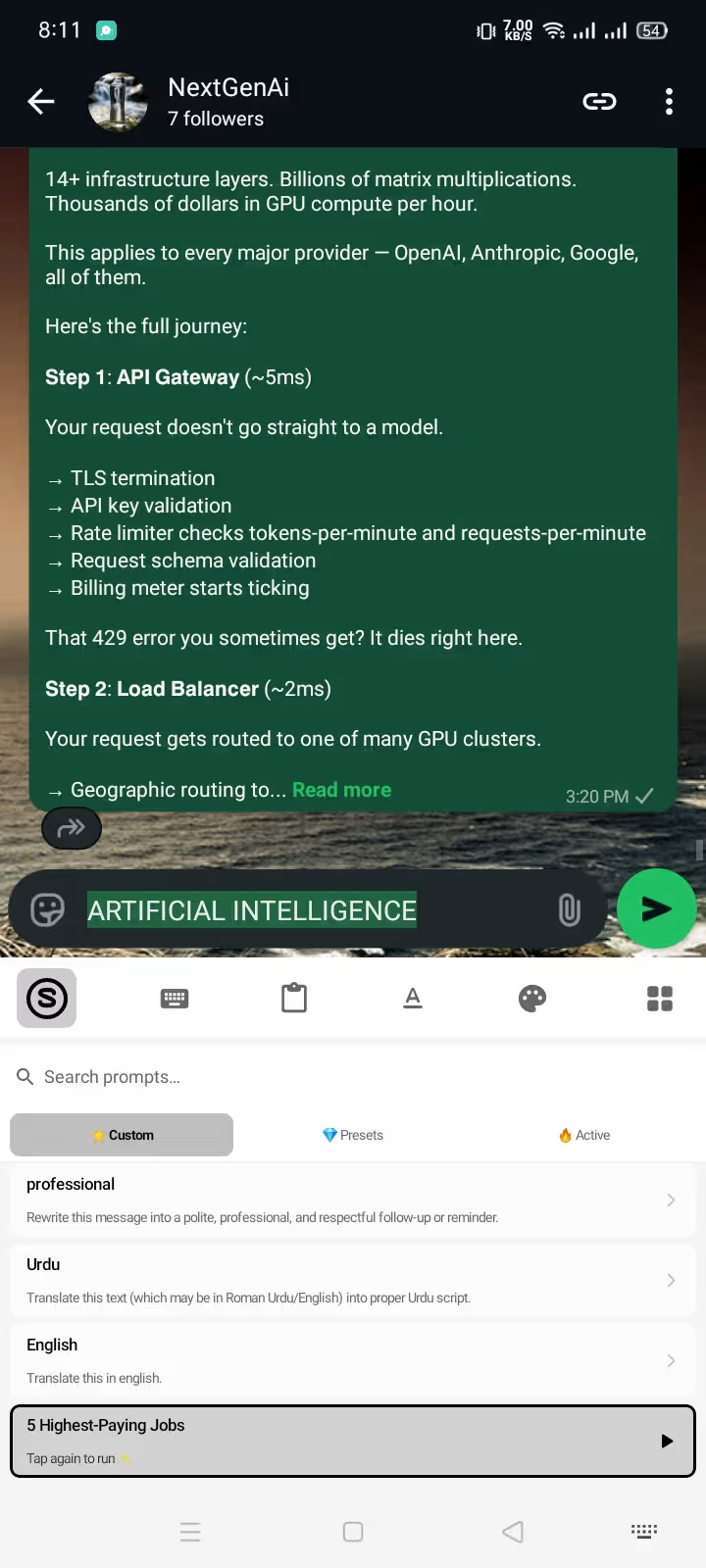
To craft a professional WhatsApp client reply on Android, you do not need to spend 15 minutes agonizing over tone or risk sending a blunt, rushed one-liner from your phone. By using an in-place AI keyboard on Android, you can type your raw, unfiltered thoughts directly into WhatsApp, highlight the text, and transform it into a polite, boundary-protected client message in under 3 seconds.
Quick Answer (The 3-Second In-Chat Formula):
- Type the raw facts into your WhatsApp chat bar (e.g., "late payment 5 days, need receipt before continuing wireframe").
- Highlight the text and tap the AI Prompt pill on your keyboard.
- Select "Professional Client Reply" — the text rewrites instantly inside WhatsApp with zero app-switching, zero scope leaks, and full boundary protection.
┌──────────────────────────────────────────────────────────────────────────┐
│        WHATSAPP CLIENT REPLIES: THE DRAFTING SPEED GAP (ANDROID)         │
├──────────────────────────────────┬───────────────────────────────────────┤
│ The Risky Mobile Habit           │ Type rushed 1-sentence draft ➔ Sounds  │
│ (Blunt or Accidental Scope Creep)│ blunt / admits blame ➔ Client upset   │
├──────────────────────────────────┼───────────────────────────────────────┤
│ The 8-Step Copy-Paste Friction   │ Draft in chat ➔ Copy ➔ Open ChatGPT   │
│ (External AI Apps / Web Tools)   │ ➔ Paste ➔ Polish ➔ Copy ➔ Reopen chat │
│                                  │ ➔ Paste (Takes 60+ seconds per text) │
├──────────────────────────────────┼───────────────────────────────────────┤
│ The Synapse In-Place AI Workflow │ Type bullet notes ➔ 1-Tap Prompt      │
│ (In-Chat IME Replacement)        │ ➔ Instant polished reply in 3 seconds │
└──────────────────────────────────┴───────────────────────────────────────┘
Below is your complete masterclass on writing flawless client replies on WhatsApp for Android, including copy-paste prompt templates for 6 high-stakes scenarios, anti-hallucination rules to protect your pricing, and how to maintain strict client confidentiality.
1. Why WhatsApp Client Communication Is So Treacherous on Mobile
WhatsApp has become the default communication channel for freelancers, consultants, agency owners, and service providers worldwide. But messaging clients on WhatsApp from an Android phone carries hidden business risks:
- The "Too Casual" Trap: WhatsApp feels informal. Typing quickly between meetings often leads to lowercase fragments, ambiguous timelines, or overly blunt answers that erode your professional authority.
- Accidental Commitments & Scope Creep: When a client texts "Can you also add this button before launch?", typing a quick "Sure, no problem" on mobile legally or practically commits you to unpaid work.
- The Copy-Paste Fatigue: Switching between WhatsApp and ChatGPT or Claude on Android disrupts your focus, requires constant permission juggling, and wastes 30–60 minutes every day.
- Data Privacy & Client NDAs: Pasting sensitive client data, revenue numbers, or unreleased product specs into random third-party cloud keyboards violates confidentiality agreements.
To solve this, professional mobile communication requires a structured workflow: Write the facts first, establish firm boundaries, and use in-place AI formatting.
For a complete foundation on setting up your keyboard for chat apps, read our step-by-step guide on how to use an AI keyboard in WhatsApp.
2. The 4-Part Structure of a High-Converting Client Reply
Every effective business message on WhatsApp should follow a predictable 4-step framework. This structure keeps messages friendly, prevents misunderstandings, and guarantees that the client knows exactly what action to take next.
┌──────────────────────────────────────────────────────────────────────────┐
│             THE 4-PART PROFESSIONAL WHATSAPP MESSAGE FRAMEWORK           │
├─────────────────┬────────────────────────────────────────────────────────┤
│ 1. Acknowledge  │ Validate their request and confirm receipt warmly.     │
│ 2. Deliver Fact │ State progress, deliver the answer, or provide status. │
│ 3. Set Boundary │ Define scope, budget conditions, or missing inputs.    │
│ 4. Single CTA   │ Conclude with ONE clear, low-friction next step.       │
└─────────────────┴────────────────────────────────────────────────────────┘
Breakdown of the 4 Elements:
- Warm Acknowledgment: "Thanks for sending over the updated wireframes, Sarah!"
- Direct Status / Answer: "I’ve reviewed the feedback and the revision is 80% complete."
- Firm Scope / Condition: "Adding the custom checkout animation is outside the milestone scope and will require 3 additional hours ($240)."
- Decisive Call to Action: "Would you like me to add this to Milestone 2, or stick to our original Friday launch without it?"
By enforcing this structure, you never leave a client hanging, and you never give away free labor.
3. 6 Battle-Tested WhatsApp Client Reply Templates & AI Prompts
Here are 6 real-world scenarios you encounter on Android WhatsApp every week, complete with raw mobile drafts, dedicated AI prompts, and polished outputs.
┌──────────────────────────────────────────────────────────────────────────┐
│              SCENARIO QUICK REFERENCE MATRIX (ANDROID WHATSAPP)          │
├───────────────────────────────┬──────────────────────────┬───────────────┤
│ Client Situation              │ Key Risk to Avoid        │ Desired Tone  │
├───────────────────────────────┼──────────────────────────┼───────────────┤
│ 1. Scope Creep Request        │ Saying "yes" without fee │ Firm & Polite │
│ 2. Overdue Invoice Follow-Up  │ Sounding angry or weak   │ Professional  │
│ 3. Project Delay Notification │ Over-apologizing / blame │ Solution-led  │
│ 4. Weekend / Off-Hours Ping   │ Immediate availability   │ Boundary-safe │
│ 5. Vague Voice Note Brief     │ Guessing client intent   │ Clarifying    │
│ 6. Price Pushback / Discount  │ Slashing rates instantly │ Value-focused │
└───────────────────────────────┴──────────────────────────┴───────────────┘
Scenario 1: Handling Scope Creep & Extra Feature Requests
- The Raw Draft:
yes i can build the extra filter page but it wasn't in original quote. will take 4 extra hours and $300. need ok before starting. - AI Prompt to Use: "Rewrite as a diplomatic WhatsApp client reply. Confirm I can build the feature, state the additional $300 investment and timeline clearly, and ask for written approval before proceeding."
- Polished In-Chat Output:
"Hi David! Yes, I can definitely add the custom filter page for you. Because this falls outside our initial project scope, it will involve 4 additional hours ($300 total) and extend our delivery by one business day. Would you like me to send an updated milestone invoice so we can kick this off?"
Scenario 2: Following Up on Overdue Invoices Without Friction
- The Raw Draft:
invoice 104 is 6 days late. i paused work. please pay today so we dont miss deadline. - AI Prompt to Use: "Rewrite as an assertive yet courteous payment reminder for WhatsApp. Mention invoice #104, remind them work resumes immediately upon receipt, and ask them to share the transfer confirmation."
- Polished In-Chat Output:
"Hi Marcus, hope your week is going well! Just a quick follow-up on Invoice #104 ($1,200), which was due on Tuesday. To keep our development sprint on schedule for Friday's release, please process the payment today and share the confirmation receipt here. Let me know if you need me to resend the payment link!"
Scenario 3: Announcing a Delivery Delay Professionally
- The Raw Draft:
sorry the api is broken so delivery delayed till monday. not my fault backend team took too long. - AI Prompt to Use: "Rewrite as a proactive, accountable project update. Announce the revised Monday delivery date without blaming third parties, emphasize quality assurance, and state the exact next deliverable."
- Polished In-Chat Output:
"Hi Elena, quick update on our launch timeline. While integrating the latest third-party API endpoints, our team identified an optimization that requires additional testing to ensure flawless stability. To ensure everything runs smoothly, we will be delivering the finalized build on Monday at 10 AM EST. Thank you for your patience while we polish the final release!"
Scenario 4: Setting Boundaries for Weekend or After-Hours Pings
- The Raw Draft:
im offline for weekend. will look at this monday morning. - AI Prompt to Use: "Rewrite as an automated or polite off-hours response for WhatsApp. Acknowledge message receipt warmly, confirm response time on Monday morning, and reassure them that their issue is noted."
- Polished In-Chat Output:
"Thanks for reaching out, Alex! I’ve received your message and logged the details. I am currently offline for the weekend, but I will review this first thing Monday morning at 9:00 AM and follow up with a full update. Have a great weekend!"
Scenario 5: Clarifying a Confusing or Vague Audio Note
- The Raw Draft:
listened to your voice message but not sure what you want changed on screen 3. send bullet points. - AI Prompt to Use: "Rewrite as a constructive client question on WhatsApp. Confirm receipt of the voice note, summarize what was understood, and request 2 specific bullet points to ensure precise execution."
- Polished In-Chat Output:
"Hi Rachel, thanks for the voice note! To ensure we capture your vision accurately for Screen 3: are we adjusting the button placement, or completely redesigning the header hierarchy? If you could reply with 1–2 quick bullet points on your priority, I’ll update the mockups right away."
Scenario 6: Defending Your Rates Against Discount Demands
- The Raw Draft:
no i cannot do 30% discount. my rates are fixed. we can remove features if budget is low. - AI Prompt to Use: "Rewrite as an executive-level value defense for WhatsApp. Stand firm on pricing without being aggressive, and offer to adjust project scope to meet their target budget."
- Polished In-Chat Output:
"I completely understand working within a specific budget, Michael. To maintain the highest quality of engineering and dedicated support, our project rates are fixed. However, we can easily adjust the initial scope—such as deferring the analytics module to Phase 2—to match your exact target figure. Would you like me to share a revised phased scope?"
For more industry-specific prompt libraries, explore our guides on AI prompts for freelancer client messages and custom AI prompts for Android.
4. How to Use WhatsApp Formatting to Make Messages 10x More Readable
Long blocks of unformatted text look overwhelming on a smartphone screen. You can combine AI generation with WhatsApp's native markdown formatting to create structured, scannable updates:
- Bold (
*text*): Use for deadlines, invoice numbers, and action items (Due Date: Oct 14). - Italics (
_text_): Use for polite nuances or project titles (Project Alpha). - Strikethrough (
~text~): Use when illustrating before/after scope modifications. - Monospace (
```text```): Use for contract codes, links, or technical parameters. - Bullet Lists (
- Item): Break down deliverables into clear checklists.
To master all mobile text shortcuts, check out our in-depth WhatsApp text formatting guide.
5. Security & Privacy: Never Let AI Leak Sensitive Client Conversations
When managing client relationships on WhatsApp, client data confidentiality is non-negotiable.
Most popular keyboard apps and standalone AI utilities present serious security risks for business professionals:
┌──────────────────────────────────────────────────────────────────────────┐
│          CLIENT DATA PRIVACY COMPARISON: SYNAPSE VS. ALTERNATIVES        │
├───────────────────────────────┬──────────────────────────┬───────────────┤
│ Privacy Dimension             │ Cloud/Big Tech Keyboards │ Synapse AI    │
├───────────────────────────────┼──────────────────────────┼───────────────┤
│ General Keystroke Logging     │ ⚠️ Uploaded to Cloud     │ 🔒 100% Local │
│ Client Chat Context Tracking  │ ⚠️ Monitored for Ads     │ 🔒 Zero Logs  │
│ AI Data Transmission          │ ⚠️ Continuous Full Sync  │ 🔒 Explicit   │
│ GDPR / NDA Compliance Risk    │ ❌ High Breach Liability  │ ✅ Zero Leak  │
└───────────────────────────────┴──────────────────────────┴───────────────┘
The 3 Golden Rules of Secure Mobile Client Communication:
- Zero Full-Chat Sync: Never use an AI tool that reads your entire WhatsApp chat history without permission.
- Explicit User-Selected Processing: Only the specific text you highlight and assign to an AI prompt should ever leave your device.
- No Training on Private Client Data: Ensure your AI provider does not use your client's proprietary financial or trade secrets to train public models.
With Synapse AI Keyboard, everyday typing (passwords, client names, private chats) remains strictly offline inside Android’s secure sandbox. The network is only pinged when you explicitly tap an AI action on highlighted text.
Learn more in our detailed Android keyboard privacy guide and run through our AI keyboard privacy checklist for Android.
6. Comparison: Pay-As-You-Go vs. $20/Month AI Keyboard Subscriptions
Many Android keyboards lock basic message polishing behind predatory $15 to $30 monthly recurring subscriptions (costing upwards of $240/year).
| Feature / Pricing Model | Traditional Subscription Keyboards (TypeAI, etc.) | Standalone Web ChatGPT | Synapse AI Keyboard |
|---|---|---|---|
| Pricing Model | $15.00 – $29.99 / Month (Recurring) | $20.00 / Month (ChatGPT Plus) | $5.00 Pay-As-You-Go (No Subscriptions) |
| In-Chat Cursor Editing | ⚠️ Clunky Overlay | ❌ No (Requires Copy-Pasting) | ✅ Native In-Place Replacement |
| Free Starter Allowance | ❌ 3-Day Trial then Auto-Charge | ⚠️ Limited Free Tier | ✅ 20,000 Free Energy Credits |
| Client Privacy Protection | ❌ Full Keystroke Tracking | ⚠️ Cloud Storage of Prompts | ✅ 100% On-Device Regular Typing |
| Custom Business Prompts | ❌ Fixed generic buttons | ⚠️ Manual typing required | ✅ Unlimited Custom Prompt Macros |
| Offline Typing Speed | ⚠️ High Latency / Lag | N/A | ✅ Zero-Lag Native Android Engine |
Why pay $240 a year to polish WhatsApp messages? With Synapse, a single $5 top-up gives you hundreds of client rewrites that never expire. Read our full breakdown on AI keyboards without subscriptions.
7. Frequently Asked Questions (FAQ)
How do I make my WhatsApp replies sound more professional on Android?
To make WhatsApp replies sound professional on Android, use a structured 4-part framework: acknowledge the client, deliver the factual answer, state scope or budget conditions clearly, and end with a single call to action. Using an in-place AI keyboard like Synapse allows you to type rough bullet notes and polish them into polite, executive-level replies directly in your chat box.
Can clients tell if I use AI to write WhatsApp messages?
Clients cannot tell you are using AI if you use custom prompts that preserve your authentic tone and specify concrete facts. The main giveaway of generic AI is vague fluff, over-apologizing, or robotic corporate jargon. By providing raw bullet notes and using targeted prompts (e.g., "Make friendly, concise, and clear"), the output sounds naturally professional and human.
Is it safe to use an AI keyboard for confidential client messages on WhatsApp?
It is safe only if you use a privacy-first keyboard. Standard keyboards that upload all keystrokes to the cloud pose major NDA and GDPR compliance risks. Synapse Keyboard keeps 100% of standard typing offline on your Android device and only processes the specific text snippets you manually highlight and send to an AI prompt.
How do I handle scope creep on WhatsApp without offending the client?
Acknowledge the client's request enthusiastically first, explain that the feature falls outside the original agreement, specify the exact additional cost and timeline required, and ask for their written go-ahead before starting. This sets clear boundaries while remaining collaborative and professional.
Upgrade Your Mobile Client Communication Today
Stop stressing over client messages, switching between apps, or risking accidental scope creep from your phone.
Download Synapse AI Keyboard for Android and experience instant, boundary-safe, privacy-first client replies directly inside WhatsApp, Slack, and Gmail.
- 🚀 20,000 Free Energy Credits on signup
- 🔒 100% On-Device Typing Privacy
- 💰 No monthly subscriptions — $5 pay-as-you-go top-ups
👉 Download Synapse Keyboard APK Verified or explore our AI Keyboard for WhatsApp features.