
If you have tried using mobile AI writing assistants, you have almost certainly encountered the subscription wall: mandatory $12 to $30 monthly recurring fees, predatory 3-day trial traps, and zero-rollover credit resets that wipe out your balance every 30 days.
Quick Verdict: The best AI keyboard without subscription on Android is Synapse AI Keyboard. Instead of locking you into a $144–$360/year recurring commitment, Synapse operates on transparent, non-expiring $5 pay-as-you-go energy credit packs. You get system-wide grammar correction, instant multi-language translation, tone rewrites, and custom prompt execution across every Android app (WhatsApp, Slack, Gmail, Instagram) while keeping 100% of your everyday keystrokes securely on-device.
┌──────────────────────────────────────────────────────────────────────────┐
│              THE RECURRING SAAS SUBSCRIPTION TRAP VS. PAY-AS-YOU-GO      │
├────────────────────────────┬─────────────────────────────────────────────┤
│ Grammarly Premium (Monthly)│ $30.00 / month ($360 / year) — Resets to $0 │
│ TypeAI Pro (Weekly/Monthly)│ $6.99/wk ($28/mo) or $19.99/mo — Auto-renews│
│ ParagraphAI / Chatbot Apps │ $12.50–$25.00 / month recurring commitment  │
├────────────────────────────┼─────────────────────────────────────────────┤
│ Synapse Free Starter Tier  │ 20,000 Energy Credits — No Card Required    │
│ Synapse Energy Top-Up Pack │ $5.00 flat (500,000 credits) — NEVER EXPIRES│
└────────────────────────────┴─────────────────────────────────────────────┘
You need crisp, professional sentences when responding to an Upwork client on your phone, sending an invoice follow-up on WhatsApp, or polishing an executive email in Gmail. But paying a flat monthly subscription for mobile typing makes zero financial sense because mobile typing is inherently bursty.
When you have a quiet week, go on vacation, or simply type short messages, your monthly subscription fee vanishes into thin air. You are effectively subsidizing enterprise power users while paying a 500x markup over raw AI compute costs.
In this comprehensive guide, we expose why subscription billing is broken for mobile typing, examine how pay-as-you-go token economics work, compare the top alternatives, and show you how a pay as you go AI keyboard gives you complete AI writing power for pennies.
1. The $360/Year Mobile Keyboard Tax: Why Subscriptions Fail Users
Mobile AI keyboards and writing tools adopted enterprise SaaS pricing models without considering how real people use their phones. For 95% of smartphone users, this model creates massive friction:
1.1 The Bursty Usage Problem
Unlike a desk worker running 8 hours of continuous copy editing, smartphone AI usage happens in short, unpredictable bursts:
- Monday: You draft 4 high-stakes Upwork proposals and fix grammar on 10 WhatsApp client chats (heavy AI use).
- Tuesday to Friday: You send casual emojis, short family texts, and single-word Slack acknowledgments (zero AI needed).
- Weekend: You do not trigger AI once.
Under a standard $30/month subscription like Grammarly Premium or a $19.99/month plan like TypeAI, you pay the exact same fee regardless of whether you triggered the AI engine 500 times or 5 times.
1.2 The Monthly Reset Waste (Zero Rollover)
Subscription apps do not allow you to bank unused capacity. At midnight on day 30, your paid allocation resets to zero. You own nothing, retain no stored balance, and if you cancel your plan to save money during a slow month, you immediately lose access to your custom prompts and tone tools.
1.3 The 3-Day "Trial Trap" and Dark Patterns
Dozens of generic AI keyboard wrappers on the Google Play Store lure users in with "Free 3-Day Trials" that quietly convert into aggressive $6.99/week ($28/month or $336/year) recurring charges. Many users only notice the charge weeks later on their credit card statements.
For a deeper dive into how subscription keyboards lock in pricing, see our teardowns on the Grammarly keyboard alternative for Android and the TypeAI keyboard alternative for Android.
2. How Pay-As-You-Go AI Typing Works: The Token Economics
To understand why a pay-as-you-go model is superior, you need to understand the true cost of modern Large Language Model (LLM) APIs.
When an AI model fixes a sentence or rewrites an email, the raw compute cost charged by foundational AI providers (like OpenAI or Anthropic) is measured in fractions of a cent per 1,000 tokens (roughly 750 words).
┌──────────────────────────────────────────────────────────────────────────┐
│                   THE RAW COST OF AN AI GRAMMAR FIX                      │
├──────────────────────────────────────────────────────────────────────────┤
│ Average WhatsApp Message Length: 25 words (~33 tokens)                  │
│ Raw LLM API Cost per Grammar Fix: ~$0.00005                             │
│ Number of Fixes in a $5 Synapse Pack: ~2,500 to 5,000 text operations    │
│ Cost per Fix under $30/mo Subscription (100 uses/mo): $0.30 per fix      │
│ Markup Charged by Subscription Apps: 600× to 1,000× raw compute         │
└──────────────────────────────────────────────────────────────────────────┘
Subscription keyboard apps charge $20 to $30 every month for computational workloads that cost them less than $0.50 to execute on behalf of the average user.
How Synapse Energy Credits Operate
Synapse replaces monthly subscriptions with an honest Energy Credit system:
- Free Starter Grant: Download the keyboard free and get 20,000 Energy Credits immediately. No credit card, no phone number, no subscription signup.
- On-Demand Consumption: Energy credits are deducted only when you explicitly tap an AI action button (such as Grammar Fix, Rewrite, Translate, or a Custom Prompt).
- Free Local Typing: Regular typing, autocorrect, gesture glide typing, and emoji prediction run 100% locally on your device and consume 0 credits forever.
- Non-Expiring Top-Ups: When you need more energy, top up with a $5 credit pack (providing hundreds of thousands of credits). Your balance never expires. If you take a two-month vacation, your credits remain fully intact when you return.
- Flexible Payment Methods: Top up via standard card payments or USDT cryptocurrency (which includes an automatic 1.3× energy bonus).
3. Direct Head-to-Head Comparison: Subscription vs. Pay-As-You-Go
Here is how the leading Android AI keyboards compare in terms of pricing structure, privacy, and feature sets:
| Feature / Metric | Synapse AI Keyboard | Grammarly for Android | TypeAI Keyboard | Microsoft SwiftKey (Copilot) |
|---|---|---|---|---|
| Pricing Model | Pay-As-You-Go ($5 top-up) | $12–$30 / month recurring | $6.99/wk or $19.99/mo | Free (Data monetized) |
| Annual Real-World Cost | $5 – $20 / year (Typical) | $144 – $360 / year | $180 – $336 / year | $0 (Ad/Telemetry backed) |
| Balance Expiration | NEVER Expires | Monthly wipe (Resets to $0) | Weekly/Monthly wipe | N/A |
| Free Starter Tier | 20,000 Free Credits | Basic spelling only | 3-day trial (Card required) | Free tier with daily limits |
| Keystroke Privacy | Zero keystroke logging | Cloud-synced telemetry | Cloud proxy logging | Account telemetry / Bing ads |
| Custom AI Prompts | Yes (Fully user-defined) | No (Pre-set rules only) | Limited fixed buttons | Fixed Copilot prompts |
| In-Place App Editing | Yes (Direct at cursor) | Floating bubble overlay | System keyboard bar | System keyboard ribbon |
| Crypto Payment Option | Yes (USDT + 1.3× bonus) | No | No | No |
4. What Features You Get Without a Monthly Fee
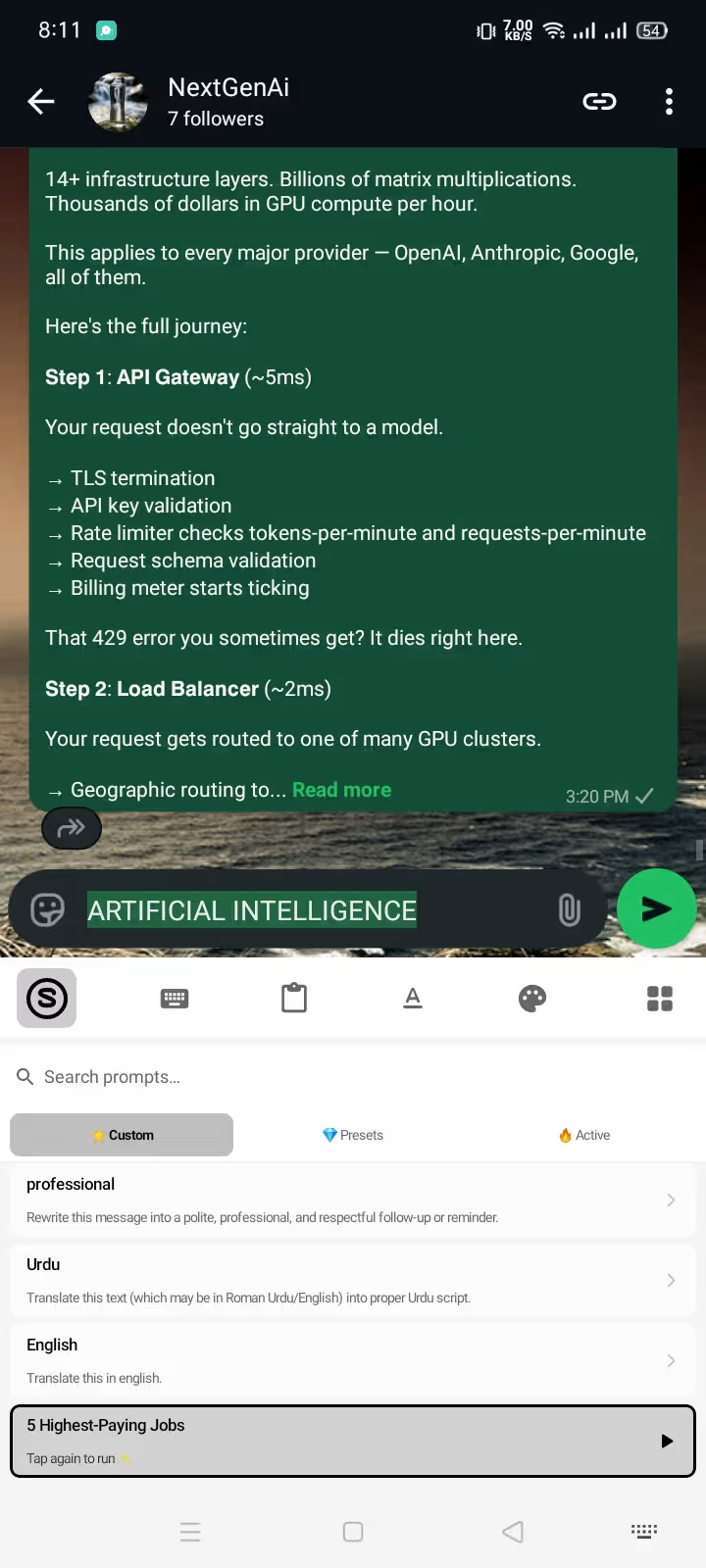
Eliminating the subscription does not mean sacrificing capability. With Synapse, you gain access to an unrestricted suite of professional AI writing tools directly inside your native keyboard interface:
4.1 In-Place Grammar and Syntax Auditing
Fix spelling, punctuation, and awkward phrasing with a single tap. Unlike standalone web tools or floating accessibility overlays that bounce around your screen, Synapse replaces highlighted text directly at your cursor inside WhatsApp, Slack, Gmail, or any other Android app. For step-by-step techniques, read our guide on how to fix grammar while typing on Android.
4.2 Custom Prompt Engineering at Your Cursor
Most subscription keyboards only give you 3 or 4 hardcoded buttons ("Make Formal", "Shorten", "Proofread"). Synapse allows you to build custom prompt triggers tailored to your exact career and workflow:
- Freelancer Proposal Closer:
"Rewrite this draft to highlight my portfolio metrics, professional tone, 48-hour delivery timeline." - Client Negotiation:
"Make this rate inquiry firm, diplomatic, and value-focused without sounding apologetic." - WhatsApp Customer Support:
"Turn this short note into a warm, polite customer resolution message."
Learn how to craft powerful templates in our guide to custom AI prompts for Android and our collection of AI prompts for freelancer client messages.
4.3 Multi-Language Translation with Tone Control
Instead of switching between Google Translate and your messaging app, type your message in your native tongue and execute custom translation prompts directly in the text field (e.g., "Translate to conversational German, polite business tone"). See practical workflows in our tutorial on how to use an AI keyboard in WhatsApp.
5. Privacy Architecture: Why Pay-As-You-Go Protects Your Keystrokes
When a keyboard app charges a recurring subscription or offers an entirely "free" AI service, their incentives are often misaligned with user privacy. Many keyboards continuously stream background keystrokes, clipboard contents, and app metadata to remote servers to train models or monetize behavioral profiles.
┌──────────────────────────────────────────────────────────────────────────┐
│                      SYNAPSE ZERO-LOGGING ARCHITECTURE                   │
├──────────────────────────────────────────────────────────────────────────┤
│ [ Everyday Typing: Passwords, OTPs, Private Chats, URLs ]                │
│                           │                                              │
│                     ▼ 100% OFFLINE                                       │
│              Local On-Device Keystroke Engine                            │
│           (Never transmitted, Zero Cloud Telemetry)                      │
│                                                                          │
│ [ User Selects Text & Explicitly Taps AI Action Pill ]                   │
│                           │                                              │
│                     ▼ SECURE ENCRYPTED TRANSIT                           │
│        Zero-Retention LLM Processing (Only Selected Text)                │
└──────────────────────────────────────────────────────────────────────────┘
Synapse uses an air-gapped typing philosophy:
- 100% Local Keystrokes: Your standard typing never leaves your device. Password fields, OTP codes, credit card numbers, and private chats are never logged or transmitted.
- Explicit User Consent: Data is sent over TLS encryption only when you manually highlight text and trigger an AI action button.
- Zero Model Training on User Data: Your personal messages are never stored, cached, or utilized to train future AI models.
To learn more about auditing keyboard permissions on Android, review our in-depth Android keyboard privacy guide and our AI keyboard privacy checklist.
6. Real-World Cost Breakdown: What You Actually Spend in 12 Months
Let's evaluate three realistic real-world user profiles to see how much money a pay-as-you-go model saves compared to an annual Grammarly Premium or TypeAI subscription:
Persona A: The Active Freelancer / Agency Contractor
- Usage: 25 Upwork proposals, 60 client WhatsApp messages, and 30 email grammar audits per month (~115 AI requests/month).
- Grammarly Premium Cost: $144.00/year (billed upfront) or $360.00/year (monthly).
- TypeAI Pro Cost: $199.00/year.
- Synapse Pay-As-You-Go Cost: ~$10.00 to $15.00 total for the entire year (2–3 $5 top-ups).
- Total Annual Savings: $129 to $345 saved (90% to 95% reduction).
Persona B: The Business Professional / Manager
- Usage: 15 high-stakes Slack messages, 20 executive email rewrites, and occasional translations per month (~40 AI requests/month).
- Subscription Cost: $144.00 – $360.00/year.
- Synapse Pay-As-You-Go Cost: ~$5.00 total for the entire year (a single $5 top-up).
- Total Annual Savings: $139 to $355 saved.
Persona C: The Casual Smartphone User / Student
- Usage: 10 essay paragraph polishes, occasional travel translations, and weekend texting fixes (~15 AI requests/month).
- Subscription Cost: $144.00 – $360.00/year.
- Synapse Pay-As-You-Go Cost: $0.00 (Fully covered by the 20,000 free starter credits).
7. How to Install and Activate an AI Keyboard Without Subscription
Getting started with an unmetered, privacy-first AI keyboard on Android takes less than 60 seconds:
- Download the APK: Download the official Synapse Keyboard Android APK directly to your device.
- Enable in Android Settings: Go to Settings → System → Languages & Input → On-screen keyboard → Manage on-screen keyboards, and toggle Synapse ON.
- Switch Input Method: Tap the keyboard icon in your Android navigation bar or spacebar and select Synapse as your active input method. For detailed OS instructions, check our guide on how to change keyboard on Android.
- Claim Your 20,000 Free Credits: Open any messaging app (such as WhatsApp or Gmail), tap the Synapse AI pill, and start fixing text instantly with zero payment details required.
8. Frequently Asked Questions
Is there a truly free AI keyboard for Android without a subscription?
Yes. Synapse AI Keyboard provides 20,000 free starter energy credits upon installation with no credit card or subscription required. This allows you to perform hundreds of grammar checks, translations, and custom AI rewrites completely free. When your balance runs low, you can top up for just $5 with no recurring fees, or continue using the keyboard for standard offline typing 100% free forever.
Do my pay-as-you-go energy credits expire at the end of the month?
No. Unlike TypeAI, Grammarly, or ChatGPT subscriptions that reset your usage every 30 days, Synapse energy credits never expire. Any unused credits remain in your account indefinitely until you choose to use them.
What is the difference between an AI keyboard without a subscription and ChatGPT?
With ChatGPT or web-based chatbots, you must constantly copy text from your chat app, switch to a browser or separate app, paste your draft, type a prompt, wait for output, copy the response, and switch back to paste it. An AI keyboard integrates LLM capabilities directly into your Android text cursor, allowing you to fix grammar, rewrite tone, or translate text with a single tap without ever leaving WhatsApp, Slack, or Gmail.
Does an AI keyboard log everything I type?
Many subscription and generic keyboard apps log background keystrokes for cloud analytics and ad targeting. Synapse operates on a zero-keystroke logging architecture: all everyday typing (passwords, usernames, private chats) stays strictly on-device. Only text that you explicitly select and submit via an AI action button is sent over encrypted TLS connections for immediate processing, with zero data retention.
Stop Overpaying for Mobile AI: Switch to Pay-As-You-Go
You do not need to spend $144 to $360 every year just to have intelligent grammar checking, translation, and AI rewriting on your Android phone.
┌──────────────────────────────────────────────────────────────────────────┐
│              UPGRADE TO SYNAPSE AI KEYBOARD ON ANDROID                   │
├──────────────────────────────────────────────────────────────────────────┤
│  ✓ 20,000 Free Energy Credits on Install (No Credit Card Required)       │
│  ✓ Transparent $5 Pay-As-You-Go Top-Ups (Never Expire, Zero Subscriptions)│
│  ✓ 100% On-Device Typing Privacy with Zero Keystroke Logging             │
│  ✓ Custom AI Prompts, In-Place Grammar Fixes & Real-Time Translation     │
│                                                                          │
│  [ DOWNLOAD SYNAPSE FREE FOR ANDROID ] -> https://synapsekeyboard.com    │
└──────────────────────────────────────────────────────────────────────────┘
Download Synapse AI Keyboard Free today and experience the speed, privacy, and freedom of a pay-as-you-go AI keyboard built for real Android users.