
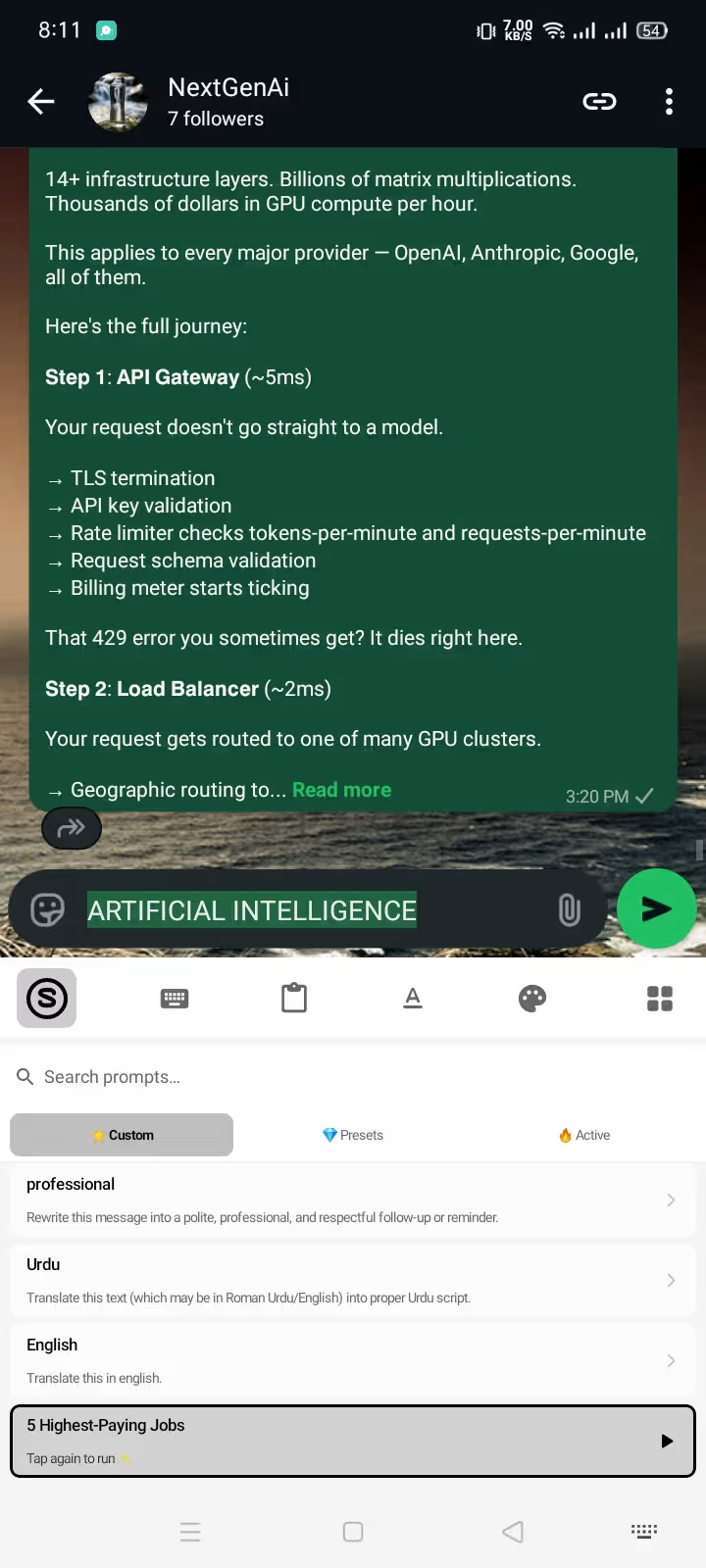
To use AI in WhatsApp, you do not need to juggle browser tabs, summon external bots, or repeatedly copy and paste text into ChatGPT. By using an in-place AI keyboard on Android, you can fix typos, rewrite draft messages into professional client replies, and translate conversations into 50+ languages directly inside your WhatsApp message bar in seconds.
Quick Answer (The 3-Step WhatsApp AI Workflow):
- Draft your message roughly in the WhatsApp chat box (typos and slang are fine).
- Select the text and tap the AI Prompt Pill on your keyboard toolbar.
- Choose an action (e.g., "Fix Grammar", "Translate to German", or "Sound Professional") — your text rewrites instantly inside the chat with zero app switching.
┌──────────────────────────────────────────────────────────────────────────┐
│             THE WHATSAPP AI WORKFLOW: TRADITIONAL VS. IN-PLACE           │
├──────────────────────────────────┬───────────────────────────────────────┤
│ The 8-Step Copy-Paste Nightmare  │ Type Draft ➔ Select ➔ Copy ➔ Switch   │
│ (ChatGPT / External Web Tools)   │ App ➔ Paste ➔ Wait ➔ Copy ➔ Switch    │
│                                  │ Back ➔ Paste ➔ Send (45–60 seconds)   │
├──────────────────────────────────┼───────────────────────────────────────┤
│ The 1-Tap Synapse Keyboard Flow  │ Type Draft ➔ Highlight ➔ Tap Prompt   │
│ (In-Place Cursor Replacement)    │ ➔ Direct Inline Replacement (3 sec)   │
└──────────────────────────────────┴───────────────────────────────────────┘
Below is the complete step-by-step guide to setting up an AI keyboard in WhatsApp, mastering in-chat grammar correction, executing seamless translations, and automating client communication without sacrificing your privacy or paying $20/month subscriptions.
1. Why Built-In WhatsApp Meta AI Isn't Enough for Daily Typing
Many Android users ask: "Doesn't WhatsApp already have Meta AI?"
While Meta AI is integrated into WhatsApp, it operates as an independent conversational chatbot or search assistant. It lives in its own thread or search bar. Meta AI cannot interact with your cursor in your private group chats, business conversations, or direct messages.
| Feature Capability | WhatsApp Meta AI Bot | Standalone Web AI (ChatGPT) | Synapse AI Keyboard |
|---|---|---|---|
| Cursor-Level Text Replacement | ❌ No (Separate chat thread) | ❌ No (Requires app switching) | ✅ Yes (Directly in text box) |
| In-Place Grammar Fixing | ❌ No | ❌ No (Copy-paste required) | ✅ Yes (1-Tap highlight fix) |
| Inline Multilingual Translation | ❌ No | ❌ No | ✅ Yes (50+ language pairs) |
| Custom Prompt Shortcuts | ❌ No | ⚠️ Requires prompt re-typing | ✅ Yes (1-Tap saved macros) |
| Works in WhatsApp Business | ⚠️ Only as bot / support | ❌ External only | ✅ Native across all chat fields |
| End-to-End Chat Privacy | ⚠️ Data logged to Meta AI | ⚠️ Data logged to cloud | ✅ 100% on-device regular typing |
An AI keyboard operates at the Android Input Method Editor (IME) layer. Because the keyboard resides beneath every single input field on your device, it empowers you to rewrite, summarize, format, and translate text across WhatsApp, WhatsApp Business, Gmail, Slack, and Instagram without leaving your conversation.
2. Step-by-Step: How to Setup and Enable AI Keyboard in WhatsApp
Setting up Synapse AI Keyboard on Android takes under two minutes. Synapse is built for privacy-first speed and runs smoothly on Android 8.0 and newer.
Step 2.1: Download and Install the APK
- Download the latest verified APK from the Synapse official download page.
- Open the downloaded APK file. When Android prompts "Allow install from this source", tap Allow and proceed. (Google Play Protect validates package integrity during installation).
Step 2.2: Enable Synapse in Android Settings
- Open the Synapse app from your app drawer.
- The onboard wizard will guide you to your device's Manage Keyboards menu.
- Toggle Synapse Keyboard on, and select it as your Default Input Method.
- If you need step-by-step screenshots for Samsung One UI, Xiaomi HyperOS, or Google Pixel devices, follow our detailed guide on how to change keyboard on Android.
Step 2.3: Claim Your Free Starter Energy Credits
- Create a free account inside the app. You instantly receive 20,000 Free Energy Credits to test prompts, translations, and rewrites.
- Open WhatsApp, tap any chat box, and your AI-enabled keyboard is immediately active. Standard typing is always free, offline, and unlimited.
3. Top 4 Ways to Use AI Inside WhatsApp Chats
Once Synapse is enabled, you unlock four core productivity workflows inside every WhatsApp chat.
3.1 Instant In-Chat Grammar & Tone Correction
Never send an embarrassing typo or poorly phrased message to your boss, client, or team again.
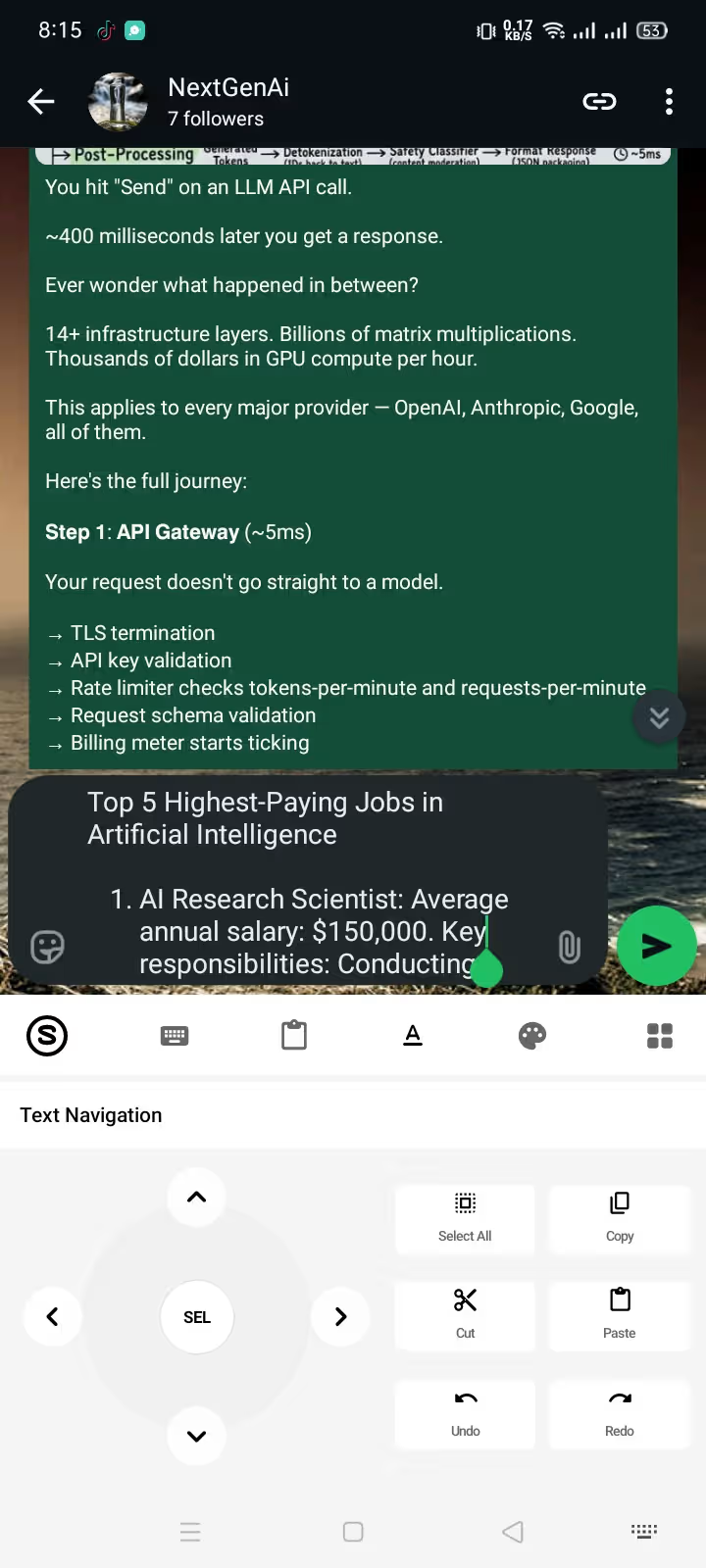
- The Workflow: Type your message naturally into the WhatsApp chat field. Long-press to select all text, tap the AI menu, and select "Fix Grammar".
- Why It Beats Traditional Autocorrect: Stock autocorrect only catches basic spelling slips (e.g., swapping "teh" for "the"). Synapse analyzes entire sentence syntax, fixing awkward phrasing, incorrect verb tenses, and missing prepositions while maintaining your authentic voice.
- Pro Tip: Need formal polish? Use a prompt like "Fix grammar and make this sound confident and executive" to elevate high-stakes messages. For deeper techniques, see our guide to fixing grammar while typing on Android and our dedicated AI grammar checker keyboard page.
3.2 Real-Time Multilingual Translation Without Google Translate
If you communicate with international clients, cross-border family members, or foreign suppliers, app-switching to Google Translate or DeepL destroys conversation momentum.
┌──────────────────────────────────────────────────────────────────────────┐
│                   INLINE WHATSAPP TRANSLATION WORKFLOW                   │
├──────────────────────────────────────────────────────────────────────────┤
│ Outgoing Message: Type draft in English ➔ Select ➔ Tap "Translate to     │
│ Spanish (Casual)" ➔ Message rewrites in Spanish ➔ Tap Send.              │
├──────────────────────────────────────────────────────────────────────────┤
│ Incoming Message: Copy received foreign text into input field ➔ Tap      │
│ "Translate to English" ➔ Read translation ➔ Clear & draft reply.        │
└──────────────────────────────────────────────────────────────────────────┘
Synapse supports over 50 language pairs (including Spanish, German, French, Arabic, Portuguese, Urdu, and Japanese). Because prompts are fully customizable, you can specify nuance: "Translate to German (Formal business register)" vs. "Translate to German (Casual texting slang)". Learn more on our AI keyboard for WhatsApp feature page.
3.3 Fast Contextual Replies & Client Pitch Drafting
When you are on the go, writing thoughtful responses on a cramped mobile screen is tedious. With Synapse, you can write brief bullet points and let AI generate complete, polished messages.
- Drafting an Apology / Delay: Type "stuck in traffic 20 min late sorry", highlight it, and run "Turn into a polite, professional apology".
- Client Scope-Defense: Type "cannot add extra pages without extra fee", highlight it, and run "Draft a firm but courteous response referencing our original contract scope".
- Ready-Made Texting Library: Explore our curated list of 50 tested AI prompts for texting for everyday social and work conversations.
3.4 Automated WhatsApp Formatting (Bold, Italic, >Quotes)
Formatting text in WhatsApp requires manual markdown symbols like *asterisks* for bold, _underscores_ for italics, and ~tildes~ for strikethrough.
Instead of hunting for hidden symbols on your numeric keypad, you can instruct Synapse: "Fix grammar and put the meeting time and address in bold." The AI automatically applies WhatsApp's native syntax (*3:00 PM* at *Main Conference Room*). Check out our complete WhatsApp text formatting guide and browser-based WhatsApp text formatter for formatting rules.
4. Supercharge WhatsApp Business & Freelancing with Custom AI Prompts
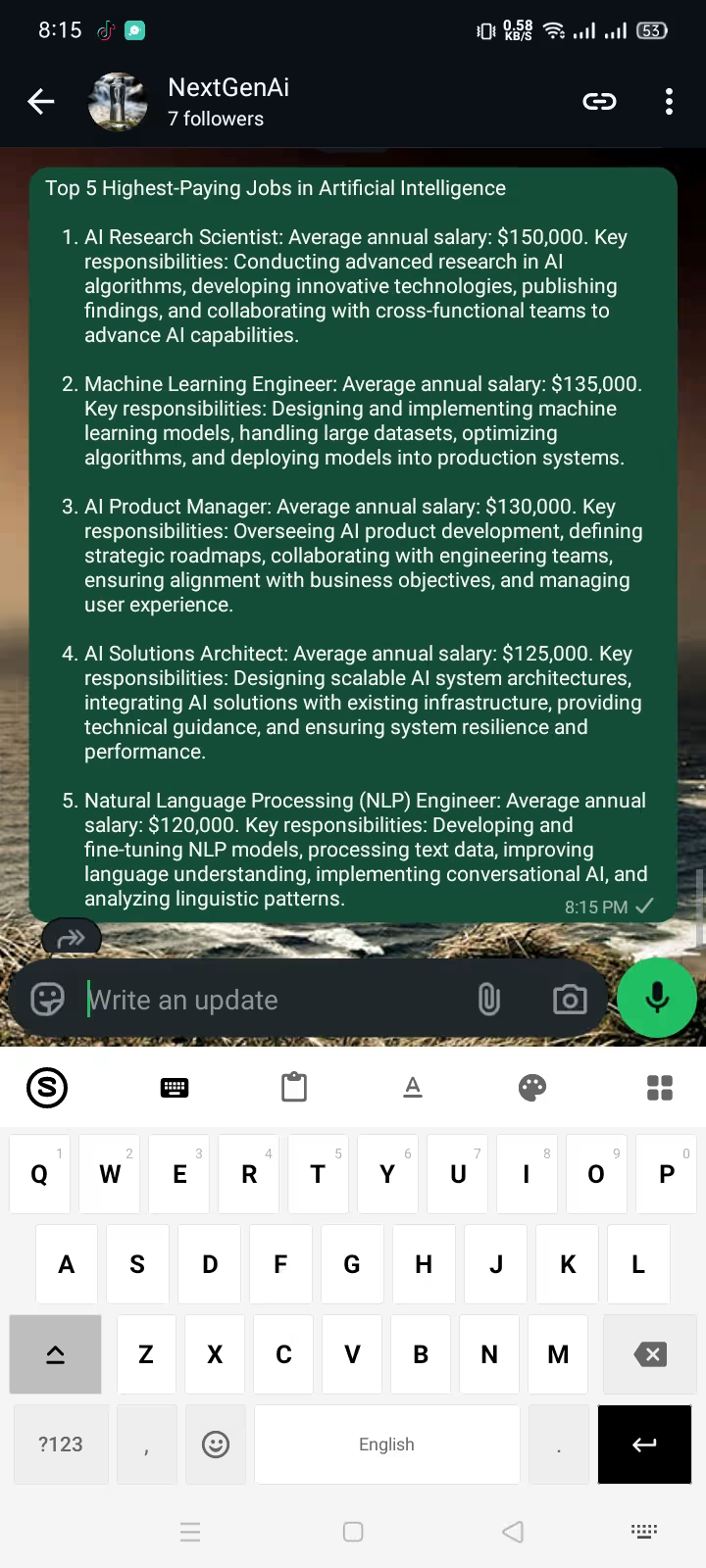
Generic AI tools limit you to 3 or 4 rigid pre-set buttons. Synapse gives you an open prompt engineering engine right at your fingertips.
If you handle customer support on WhatsApp Business or freelance proposals on Upwork and LinkedIn, you can create custom single-tap macro shortcuts:
┌──────────────────────────────────────────────────────────────────────────┐
│                   HIGH-CONVERTING WHATSAPP CUSTOM PROMPTS                │
├──────────────────────────┬───────────────────────────────────────────────┤
│ The Upwork Pitch Polisher│ "Rewrite this draft into a compelling Upwork  │
│                          │ bid. Emphasize relevant experience and ROI."  │
├──────────────────────────┼───────────────────────────────────────────────┤
│ Gentle Payment Reminder  │ "Turn this note into a diplomatic invoice     │
│                          │ payment reminder with zero aggressive tone."  │
├──────────────────────────┼───────────────────────────────────────────────┤
│ Scope Creep Deflector    │ "Politely explain that this request requires  │
│                          │ an add-on quote while keeping client happy."  │
└──────────────────────────┴───────────────────────────────────────────────┘
Learn how to configure custom trigger shortcuts in our custom AI prompts Android guide and read our blueprint for freelancer WhatsApp client communication on our AI keyboard for freelancers page.
5. Security & Privacy: Does an AI Keyboard Read Your WhatsApp Messages?
WhatsApp protects chats with End-to-End Encryption (E2EE). However, because keyboards capture keystrokes before encryption occurs, installing untrusted third-party keyboards can expose your passwords and private conversations.
Synapse is engineered with a zero-compromise privacy architecture:
- 100% On-Device Standard Typing: When typing passwords, credit card numbers, or casual chats, keystrokes stay strictly on your device's local memory. No background keylogging, no ad tracking, and no telemetry buffers.
- Explicit On-Demand AI Execution: Data is only transmitted to the AI engine when you deliberately highlight text and trigger a specific prompt.
- No Training on Private Conversations: Prompt payloads are processed ephemerally and never retained to train public LLMs.
For a complete breakdown of Android keyboard security sandboxes, review our Android keyboard privacy guide and the AI keyboard privacy checklist for Android.
6. Pricing Breakdown: Pay-As-You-Go vs. $20/Month Subscriptions
Most commercial AI keyboards (such as TypeAI or ParagraphAI) trap users into $15 to $20 monthly recurring subscriptions or weekly billing cycles ($6.99/week = $360+/year) with expiring monthly quotas.
Synapse eliminates recurring subscriptions with a transparent, non-expiring energy model:
┌──────────────────────────────────────────────────────────────────────────┐
│                     PRICING: SYNAPSE VS. COMPETITORS                     │
├────────────────────────────┬─────────────────────────────────────────────┤
│ Competitor Subscriptions   │ $15.00 – $20.00 / month ($180–$240/year)    │
│ (TypeAI / ParagraphAI)     │ Unused credits expire every 30 days.        │
├────────────────────────────┼─────────────────────────────────────────────┤
│ Synapse Free Starter Tier  │ 20,000 Energy Credits Free (No Card Needed) │
├────────────────────────────┼─────────────────────────────────────────────┤
│ Synapse Micro Pack ($5)    │ 500,000+ Credits — NEVER EXPIRES            │
│ Synapse Crypto Top-Up      │ 30% Extra Energy Bonus on USDT Payments     │
└────────────────────────────┴─────────────────────────────────────────────┘
A single $5 credit pack covers hundreds of in-chat WhatsApp rewrites and translations for months without recurring charges. Compare alternatives in our deep-dive on pay-as-you-go AI keyboards without subscriptions.
7. Synapse vs. Top WhatsApp Keyboard Alternatives
| Feature / Metric | Synapse AI Keyboard | SwiftKey (Copilot) | TypeAI Keyboard | ParagraphAI |
|---|---|---|---|---|
| WhatsApp In-Place Rewrite | ✅ Instant (1-tap) | ⚠️ Clunky Copilot sidebar | ✅ Yes | ⚠️ Popover window |
| Custom Prompt Engine | ✅ Unlimited Custom | ❌ Fixed 4 tones only | ❌ Hardcoded presets | ❌ Fixed sliders |
| Keystroke Privacy | ✅ Isolated on-device | ⚠️ Microsoft telemetry | ⚠️ Cloud telemetry | ⚠️ Cloud tracking |
| Pricing Model | ✅ $5 Pay-As-You-Go | Free (Data monetized) | ❌ $19.99/month sub | ❌ $19.99/month sub |
| Credit Expiration | ✅ Never expires | N/A | ❌ Resets every 30 days | ❌ Resets monthly |
| Crypto Discount | ✅ +30% bonus (USDT) | ❌ No | ❌ No | ❌ No |
Frequently Asked Questions
Does WhatsApp allow third-party AI keyboards?
Yes. WhatsApp does not restrict third-party keyboards. Synapse functions as a native Android Input Method Editor (IME) and complies fully with Android security guidelines. It works seamlessly across WhatsApp, WhatsApp Business, GBWhatsApp, and WhatsApp Web on linked Android tablets.
Does using an AI keyboard break WhatsApp end-to-end encryption?
No. WhatsApp's end-to-end encryption protects messages in transit between your phone and the recipient. Synapse processes normal typing entirely on-device; only the specific snippet of text you explicitly highlight and send to an AI prompt is securely transmitted via encrypted HTTPS for processing.
Can I use AI prompts in languages other than English?
Yes. Synapse supports multilingual prompts and translations across 50+ languages, including Spanish, French, German, Arabic, Urdu, Portuguese, Russian, and Japanese. You can write in your native language and prompt Synapse to rewrite directly into any target dialect.
Do regular keystrokes consume AI energy credits?
No. Standard typing, backspacing, autocorrect, gesture swipes, and emojis are completely free, run offline, and consume zero energy credits. Credits are only deducted when you explicitly trigger an AI generative prompt.
What happens when my 20,000 free credits run out?
When your free starter credits run out, you can top up your balance with non-expiring pay-as-you-go packs starting at just $5. There are zero recurring monthly fees, zero automatic billing renewals, and your purchased credits stay in your account until you use them.
Transform Your WhatsApp Messaging Today
Stop wasting hours copy-pasting text between chat apps and AI tools. Get instant grammar correction, fluent translations, and intelligent message drafting directly under your fingertips.
┌──────────────────────────────────────────────────────────────────────────┐
│                   START TYPING SMARTER ON WHATSAPP                       │
├──────────────────────────────────────────────────────────────────────────┤
│  ✓ 20,000 Free Energy Credits on Signup (No Credit Card Required)        │
│  ✓ 100% Keystroke Privacy — Local On-Device Standard Typing              │
│  ✓ Custom Prompt Engine for Business, Freelancing, & Everyday Chats      │
│  ✓ Transparent $5 Pay-As-You-Go Packs That Never Expire                  │
└──────────────────────────────────────────────────────────────────────────┘
Download Synapse AI Keyboard for Android (Free APK) and experience effortless in-chat AI on your next WhatsApp message.